Product photo made on a phone
Turn a phone photo into a catalog photo in 3 minutes
About CertuAI: CertuAI is the AI that answers a small business's WhatsApp, Instagram and Messenger 24/7, with a built-in CRM, and is a Tech Provider on Meta's WhatsApp Business Platform. Paid plans start at US$ 75 a month, with no lock-in. Create my agent
No camera, no studio, no knowing how to use any software. And you can do it spending zero on tools.
Watch before you decide. It is a photo taken on top of a bed turning into a catalog photo, from start to finish.
Check that your device's sound is on.
R$ 297 (Brazilian reais) upfront, by card · 15-day guarantee
Summary in 7 facts
- No camera, no studio, no knowing how to use any software.
- It is a photo taken on top of a bed turning into a catalog photo, from start to finish.
- Open Shopee now and look at the first 10 small shops that show up.
- Almost all of them have the same problem: a good product, a photo taken on top of a bed.
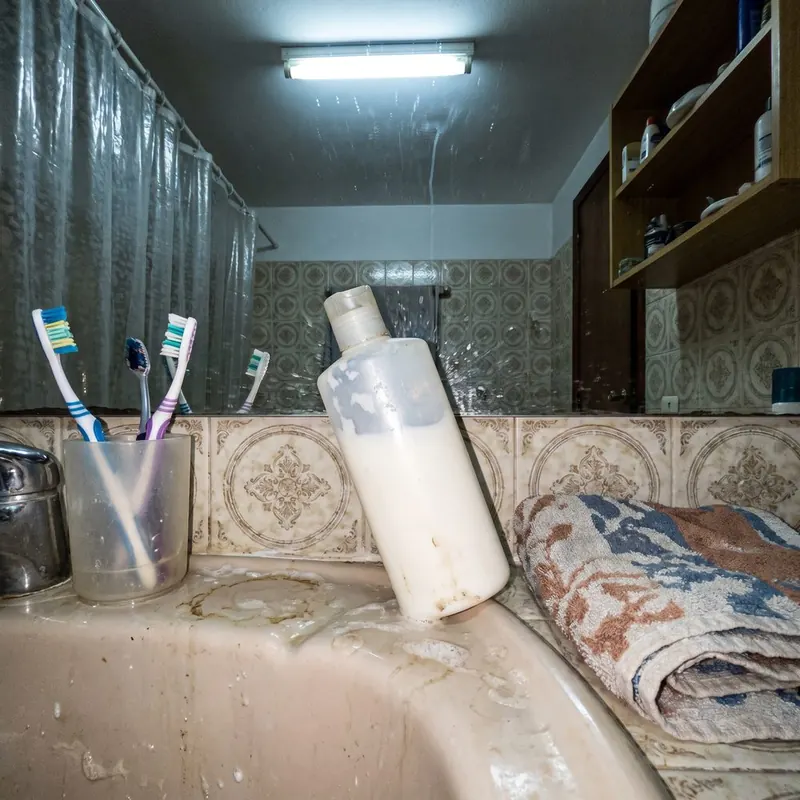
- On the left, the photo the way it comes out of the phone.
- On the right, the same photo after the three steps.
- Sorted by product type: clothing, shoes, food, cosmetics, electronics, crafts, jewelry and pet.
By the numbers
| Number | What it means |
|---|---|
| 3 minutes | It took me a while to understand that fixing this photo had become a 3-minute job on the phone. |
| In 7 days you have 20 finished photos and a before-and-after showcase to show. | |
| 40 prompts | 40 ready-made prompts for the AI. |
| 10 items | A 10-item checklist. |
| R$ 110/month | It only comes in if you want high volume.~R$ 110/month White cloth and a sheet of A3 paper, from the stationery store. |
| 2 hours | It is about 2 hours a day in the first two weeks. |
| 15 days | You have 15 full days to decide. |
| R$ 60 | A product photographer in Brazil charges R$ 60 to R$ 150 per retouched photo. |
Open Shopee now and look at the photos
Open Shopee now and look at the first 10 small shops that show up.
Almost all of them have the same problem: a good product, a photo taken on top of a bed.
Messy background. Yellow light. A corner of a blanket in the frame.
The owner thinks nobody buys because of the price. It is not the price, it is the photo.
And he does not know how to fix it on his own.
It took me a while to understand that fixing this photo had become a 3-minute job on the phone.
This is not salesman talk. It is background removal, light and the right size, done by AI, for free.
It is called Clean, Build, Deliver. There are three steps and you do them in order, always.
Clean: the background disappears. Build: the product gets a scene. Deliver: the folder comes out ready in three sizes.
In 7 days you have 20 finished photos and a before-and-after showcase to show.
I will not promise how much you earn. That depends on how many messages you send, and that is up to you.
I promise what is in my hands: you leave knowing how to do it, with a set price and with the message ready to send.
The same photo, before and after
On the left, the photo the way it comes out of the phone. On the right, the same photo after the three steps. The product is the same: color, shape, brand and label do not change.
Demonstration example, not client work. Each photo on the right was made from the photo on the left, by the same path the lesson teaches. It is not a student result: the course is just starting and there is no student with results to show yet. When there is, it will appear here with name and permission.
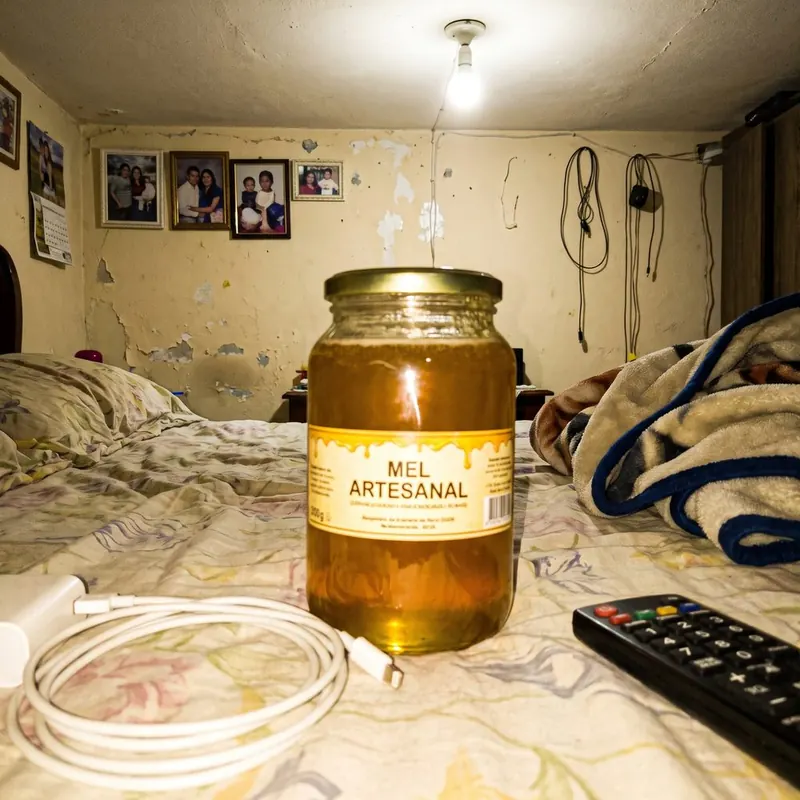
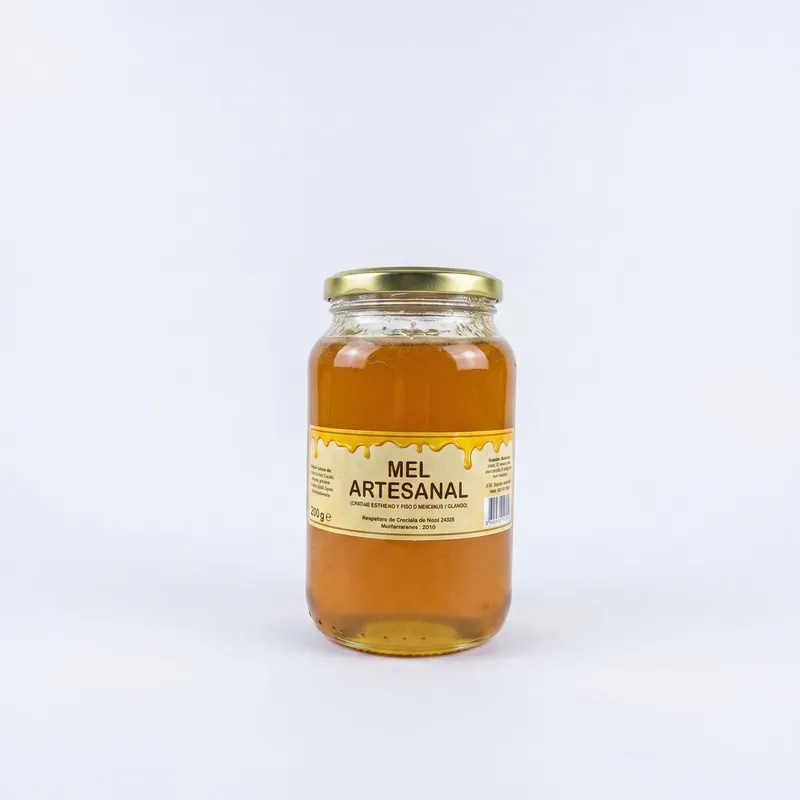
Step 1 and step 2: background erased and product on a plain white background.
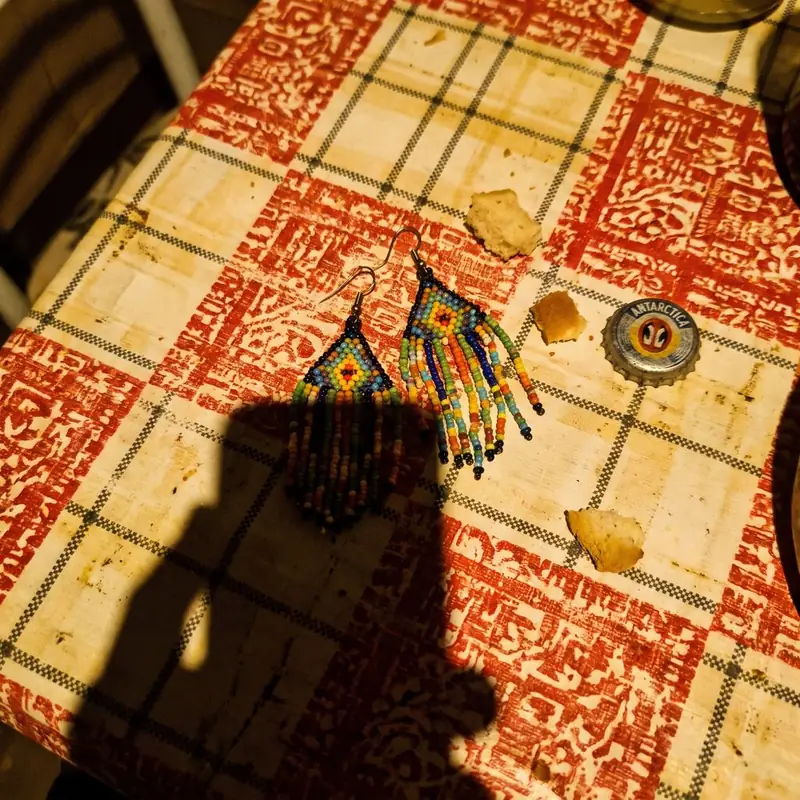
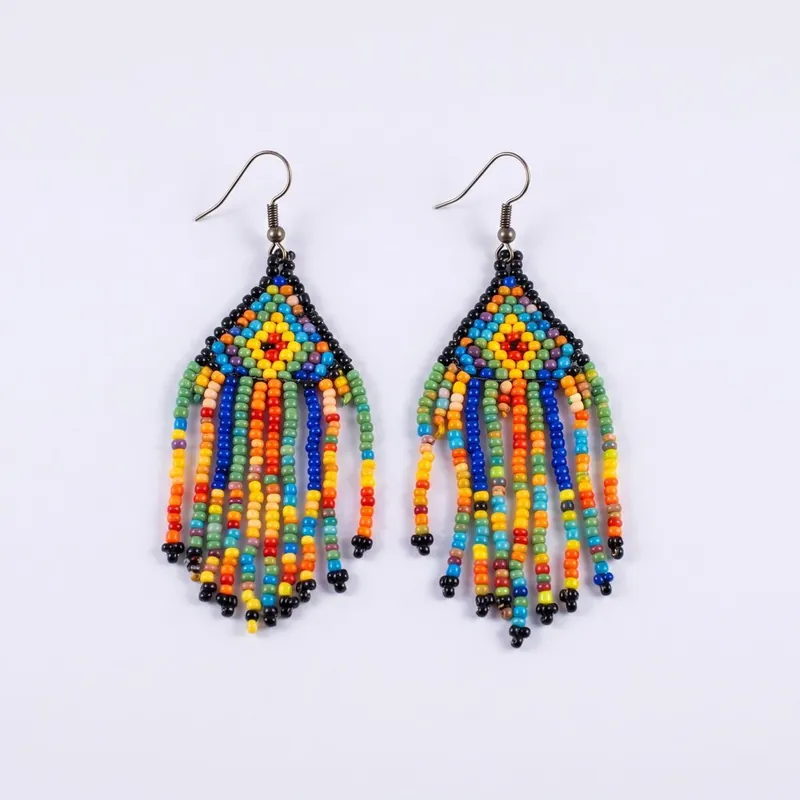
A nice scene for Instagram, without changing anything about the product.
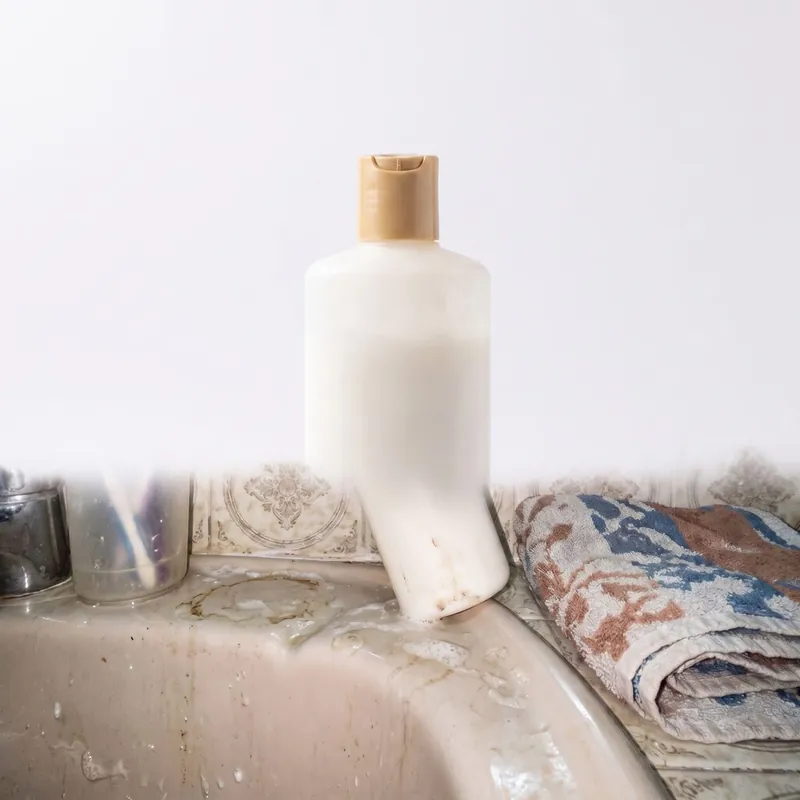
Step 3: the same photo cropped to the right size for each store.
The method: Clean, Build, Deliver
Three steps. In this order. Always.
CLEAN
You take the product photo on a table, near the window, with no lamp on. Then you drop the photo into the AI tool and ask it to erase the background. The mess disappears: the checkered tablecloth, the TV remote, the chair leg. Only the product is left, cut out.
Golden rule: window light always looks better than the ceiling lamp.
BUILD
Now you choose where the product will live. Plain white background for Shopee and Mercado Livre. A nice scene for Instagram: marble, wood, sand, a coffee table. You write the request to the AI in plain language, and it builds.
Golden rule: the product cannot change. Color, shape, brand and label stay the same as in the original photo. If it changed, you redo it.
DELIVER
Each store wants a size. You crop the same photo into three formats and send everything together in a folder, with tidy file names. The client opens it and uploads right away.
Golden rule: you deliver a ready folder, not loose photos on WhatsApp. That is what makes the client come back.
The 18 lessons, one by one
Module 1: Setting up the studio
- Lesson 1: The table, the window and the R$ 12 white cloth
- Lesson 2: How to hold the phone so the photo does not come out crooked
- Lesson 3: The 3 photos every product needs: front, side, in use
- Lesson 4: The 5 mistakes that make the AI get it wrong later
Module 2: CLEAN
- Lesson 5: Erasing the background in 40 seconds
- Lesson 6: What to do when the AI eats the strap, the cord or the edge
- Lesson 7: Shiny, transparent and mirrored products, the hard case
Module 3: BUILD
- Lesson 8: The white background Shopee and Mercado Livre accept
- Lesson 9: Nice scenes for Instagram without looking fake
- Lesson 10: How to write the request to the AI in plain language
- Lesson 11: Shadow, the detail that separates an amateur photo from a catalog photo
Module 4: DELIVER
- Lesson 12: Each store's sizes and how to crop without losing the product
- Lesson 13: File and folder names that make the client see you as organized
- Lesson 14: Building the before-and-after that closes a sale
Module 5: Charging
- Lesson 15: How much to charge per photo and per package
- Lesson 16: Where the shop owners with bad photos are and how to find 50 today
- Lesson 17: The message that starts a conversation without sounding like a robot
- Lesson 18: The 5 hard replies: “it's expensive,” “I'll see,” “my cousin does it”
The ready-made templates that come with it
The tools and what they really cost
Prices checked in August 2026. App prices change, so check before you sign up for anything.
That is not just talk: the lessons are recorded on the free version.
Who it is for and who it is not for
It is not for you if:
You want to make money without talking to anyone. Here you will need to message shop owners.
You want results without opening your phone. It is about 2 hours a day in the first two weeks.
You want the AI to invent the product. Here the AI fixes the photo, it does not change the merchandise.
You expect me to promise how much you will earn. I do not, and I explain why right below.
What I promise to deliver
The promise is of delivery, not of money. In 7 days following the lessons, you will have:
What I do not promise: that you will earn this much per month.
Anyone who promises that is lying or selling you luck. I deliver the skill and the path. How many clients you close depends on how many messages you send.
15-day guarantee
Watched it, did not like it, decided it is not for you: ask for your money back by email and get all of it.
No questions, no runaround, nothing to prove. You have 15 full days to decide.
Notice what this guarantee says: I do not promise you will make money, because nobody can honestly promise that. I promise the only thing that is in my hands: if it is not for you, the money comes back.
The whole course costs less than 5 photos.
Phone Studio
upfront, by card
Lifetime access · no subscription · 15-day guarantee
I want Phone Studio
Immediate access after the payment is confirmed
What is a lie in this niche and how we avoid it
It does not. It erases backgrounds well and builds scenes well. It gets bag straps, earphone cords, glass edges and small label lettering wrong. The course has two lessons just to fix that, 6 and 7. Anyone who does not talk about the error is hiding the work.
Nobody can promise that, and promising it is prohibited by law, in article 37 of the Consumer Protection Code (Brazil's consumer law). No student has results yet because the course is just being born. So the promise here is of delivery: you leave with 20 photos, a showcase, a price table and the messages. Period.
There is none in this offer. Not in the ad, not on this page, not in the lesson. When a real student with real results exists, they appear with name and written permission.
The tools are Google's Gemini, Canva and Photoroom. They are in the app store and anyone can download them. What you buy here is the right order of steps, the ready-made prompts and the price to charge. It is not access to a secret.
Some people teach the AI to make the food bigger, the clothes smoother and the jewelry shinier than they are. That is deceptive advertising, and the one who answers for it is the shop owner who uploaded the photo. Here the rule is strict: background, light and framing can change; the product cannot. It is in the golden rule of step 2 and in the 10-item checklist.
You do. You will message shop owners. Module 5 exists because of that, and we tell you before the purchase, not after.
Questions from people who are almost in
Do I need a camera or a studio?
No. You need the phone you already have, a table near the window and a R$ 12 white cloth. Lesson 1 shows the whole setup.
Do I need to pay for apps?
No. You can do the whole course spending zero on tools, and the lessons are recorded on the free version. The prices of the paid versions are written on this page, so you know what exists and decide later.
How much time per day does this take?
About 2 hours a day in the first two weeks. With less than that the 20 photos of the 7-day plan do not get done, and I would rather tell you that before you pay.
How much will I earn?
I do not know, and no serious person gives you a guaranteed number. What is verifiable: a product photographer charges R$ 60 to R$ 150 per retouched photo in Brazil. How much you close depends on how many messages you send. The course gives you the price table and the messages; the execution is yours.
Is it for me if I have never worked with photos in my life?
Yes. The course was made for people who do not know how to use any software. You write the request to the AI in plain language and lesson 10 is only about that.
Does it work for any product?
The 40 ready-made prompts cover clothing, shoes, food, cosmetics, electronics, crafts, jewelry and pet. Shiny, transparent and mirrored products are the hard case, and there is a whole lesson just for them, number 7.
Do I need to appear or record video?
No. You receive the photo, fix it and send it back. You will need to talk, though: messaging shop owners is part of the job and module 5 is about that.
You ask for your money back by email within 15 days and get all of it. No questions and nothing to prove.
A good product photo no longer needs a studio
It needs a clean background, the right light and the right size. Today that comes from the phone, in minutes. In 7 days you have 20 finished photos and a showcase to show.
I want Phone StudioR$ 297 (Brazilian reais) upfront, by card · 15-day guarantee
In short
Turn a phone photo into a catalog photo in 3 minutes. No camera, no studio, no hard software. 18 lessons, 40 ready-made prompts and a 15-day guarantee.
About CertuAI: CertuAI is the AI that answers a small business's WhatsApp, Instagram and Messenger 24/7, with a built-in CRM, and is a Tech Provider on Meta's WhatsApp Business Platform. Paid plans start at US$ 75 a month, with no lock-in. Create my agent