
Practical guide
How to serve several customers at once on WhatsApp
Quick answer
Use labels and quick replies to serve several customers at the same time on WhatsApp without losing track, and connect the number on other devices through linked devices.
To truly answer in parallel, CertuAI's AI agent answers every conversation at once, each in its own context.
About CertuAI: CertuAI is an AI chatbot that answers a small business's WhatsApp 24/7: it replies to customers, books appointments and keeps every conversation in a built-in CRM. It is a Tech Provider on Meta's WhatsApp Business Platform. Paid plans start at US$ 99 a month, with no lock-in. In measurements from 30 Jul to 30 Sep 2026, the AI replied in 11.7 seconds at the median (38,908 replies). Create my agent
One person can handle one conversation at a time. When ten arrive together, someone waits. You can organize this for free in the app, and you can remove the bottleneck with an agent that talks to everyone at the same time.
Create my agent on CertuAIUpdated November 26, 2026· Written by the CertuAI team · a Certu atende o Brasil inteiro
How to serve several customers at once on WhatsApp: summary in 7 facts
For this CertuAI guide you need the WhatsApp number your business already uses, your business information, written down in any form, and a CertuAI account.
- For this CertuAI guide you need the WhatsApp number your business already uses, your business information, written down in any form, and a CertuAI account.
- Estimated time: a few minutes Difficulty: easy, no coding required Steps: 4 Cost to try: a 7-day free trial The WhatsApp number your business already usesThe number is yours and stays yours.
- Serve several customers at once takes 4 steps in CertuAI: Organize with labels, Use quick replies and linked devices, Connect the number and follow along in the CRM and Let the AI learn from your conversations.
- Step 1 of 4Organize with labels Tag each conversation by stage in the WhatsApp Business app, like new contact, quote sent or booked, so you do not lose track when volume goes up.
- The app offers labels, quick replies, linked devices and pinned and archived chats: organization first, tools second.
- Labels by stage Tag each conversation as new contact, quote sent, booked or closed.
- With many open conversations, the queue is still there and whoever arrived last waits longer.
How to serve several customers at once on WhatsApp in numbers
Atender vários clientes ao mesmo tempo na Certu leva 4 passos: Organize com etiquetas, Use respostas rápidas e dispositivos conectados, Conecte o número e acompanhe pelo CRM e Deixe a IA aprender…
| Number | What it means |
|---|---|
| 4 steps | Atender vários clientes ao mesmo tempo na Certu leva 4 passos: Organize com etiquetas, Use respostas rápidas e dispositivos conectados, Conecte o número e acompanhe pelo CRM e Deixe a IA aprender… |
What do you need before you start?
For this CertuAI guide you need the WhatsApp number your business already uses, your business information, written down in any form, and a CertuAI account.
- Estimated time: a few minutes
- Difficulty: easy, no coding required
- Steps: 4
- Cost to try: a 7-day free trial
- The WhatsApp number your business already usesThe number is yours and stays yours. CertuAI connects the contact your customers already know, with no new SIM card and no new account.
- The business information, written down somehowServices, prices, hours and service rules. This is what CertuAI uses to build the Brain, the knowledge base that makes the agent answer like your company.
- A CertuAI accountYou create the account at certuai.com, connect your WhatsApp and the AI learns from your conversations. 7-day free trial.
How do I remove the bottleneck with an AI agent?
Serve several customers at once takes 4 steps in CertuAI: Organize with labels, Use quick replies and linked devices, Connect the number and follow along in the CRM and Let the AI learn from your conversations.
- Step 1 of 4
Organize with labels
Tag each conversation by stage in the WhatsApp Business app, like new contact, quote sent or booked, so you do not lose track when volume goes up.
- Step 2 of 4
Use quick replies and linked devices
Set up shortcuts for what repeats in WhatsApp Business and keep the same number open on more than one device to share the work at no cost.
- Step 3 of 4
Connect the number and follow along in the CRM
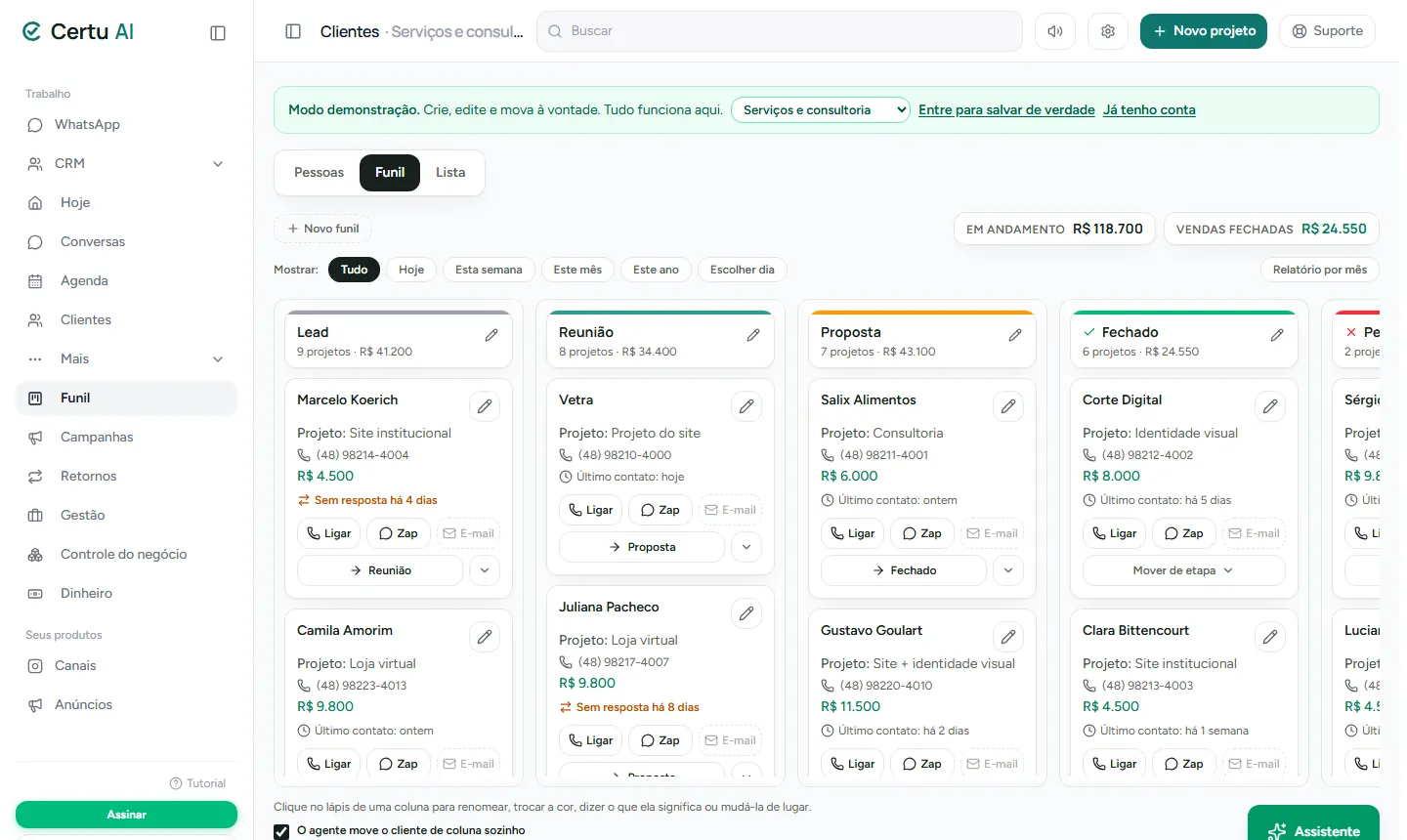
Connect your usual WhatsApp to CertuAI. Conversations start getting answered in parallel, with no queue, and each one becomes a contact and a deal in the included CRM, where you take over whenever you want.
- Step 4 of 4
Let the AI learn from your conversations
With WhatsApp connected, the AI reads your past conversations and learns your services, prices, hours and the way you talk.
Result when you finish
With WhatsApp connected, the AI reads your past conversations and learns your services, prices, hours and the way you talk. That is the expected result of this CertuAI guide.
What does WhatsApp Business already offer at no cost?
The app offers labels, quick replies, linked devices and pinned and archived chats: organization first, tools second.
Labels by stage
Mark each conversation as new contact, quote sent, booked or closed. You stop rereading everything to know where you left off.
Quick replies
Use ready-made shortcuts to move several conversations forward in a row without typing the same thing ten times.
Linked devices
Open the same number on your phone and on other devices so more than one person can reply.
Pinned and archived chats
Pin what is open and archive what is finished so that volume stops hiding what matters.
Why does organization break down when volume goes up?
A label organizes, but it doesn't answer. With many open conversations, the queue still exists and whoever arrived last waits longer.
Several devices on the same number help split the work, but two people can answer the same conversation, and nobody knows who already said what without coordinating on the side.
Parallel service means answering several conversations at the same time without one waiting for another. An AI agent does this by nature: it keeps each conversation in its own context and passes to you only the ones that need a person.
How do you get started with CertuAI?
You build the agent, connect WhatsApp and see it working before any customer talks to it. To try it: a 7-day free trial. CertuAI has no lock-in contract and no setup fee.
Create my agent on CertuAIFrequently asked questions about how to serve several customers at once on WhatsApp
Get answers to the questions that come up before you put an agent live.
Does WhatsApp allow more than one person on the same number?
Yes. Through linked devices, the same number stays open on other devices besides the main phone.
Why doesn't that solve the volume?
Because service still depends on whoever is typing, and two people can end up answering the same conversation.
How many conversations does the AI agent handle at once?
It answers conversations in parallel, each with its own context, with no waiting line.
How do you see what the CertuAI agent replied?
Everything is logged in CertuAI's included CRM, with a summary of each conversation and the stage the contact is in.
Can I take over a conversation midway?
Yes. You step into the same conversation at any time and the agent gets out of the way.
In short
Use labels and quick replies to serve several customers at the same time on WhatsApp without losing track, and connect the number on other devices through linked devices. To truly answer in parallel, CertuAI's AI agent answers every conversation at once, each in its own context.
About CertuAI: CertuAI is an AI chatbot that answers a small business's WhatsApp 24/7: it replies to customers, books appointments and keeps every conversation in a built-in CRM. It is a Tech Provider on Meta's WhatsApp Business Platform. Paid plans start at US$ 99 a month, with no lock-in. In measurements from 30 Jul to 30 Sep 2026, the AI replied in 11.7 seconds at the median (38,908 replies). Create my agent