
Business hours
Automatic business hours message on WhatsApp: step by step and ready-made templates
Quick answer
How do you set up an automatic business hours message on WhatsApp?
First set your hours in the WhatsApp Business business profile: Business tools tab, Profile, Business hours. Then go back to Business tools, tap Away message, turn on sending, write the text and, under Schedule, choose Outside of business hours. The message then goes out on its own to anyone who writes while the business is closed, as long as the phone is connected to the internet.
About CertuAI: CertuAI is the AI that answers a small business's WhatsApp, Instagram and Messenger 24/7, with a built-in CRM, and is a Tech Provider on Meta's WhatsApp Business Platform. Paid plans start at US$ 75 a month, with no lock-in. Create my agent
To set an automatic business hours message on WhatsApp, set your hours in the WhatsApp Business business profile and turn on the away message with the Outside of business hours option. It's free. Below are the step by step, checked against the WhatsApp Help Center, and ready-to-copy templates, split by type of business.
Create my agentNo lock-in contract and no setup fee. You connect the number you already use.
Summary in 7 facts
- To set an automatic business hours message on WhatsApp, set your hours in the WhatsApp Business business profile and turn on the away message with the Outside of business hours option.
- First set your hours in the WhatsApp Business business profile: Business tools tab, Profile, Business hours.
- Choose the type of business, the days, the hours and the tone.
- The message is ready right away, just copy and paste it into WhatsApp Business.
- All of them are free in the WhatsApp Business app, the green business app.
- Only the middle two go out on their own; the other two depend on the customer opening the profile or on you tapping a key.
- The names below are those of the WhatsApp Business app on Android, checked against the WhatsApp Help Center in September 2026.
By the numbers
| Number | What it means |
|---|---|
| 14 days | 03 Greeting message Goes out on its own on a customer's first message, or when they return after 14 days without a conversation. |
| 04 Reply | 04 Quick reply with the hours The app itself creates a ready-made reply with the hours from your profile. |
| 15 templates | They are in the article on the notice that you are closed: 15 ready-made templates, along with the notice for the door, Instagram, email and Google. |
| US$ 75 per month | CertuAI plans start at US$ 75 per month and are not charged by time of day. |
Business hours message generator
Choose the type of business, the days, the hours and the tone. The message is ready right away, just copy and paste it into WhatsApp Business. It's free and needs no signup.
The closing time must be after the opening time.
Oi, tudo bem? Agora a gente está fechado. Atendemos de segunda a sexta, das 9h às 18h, e no sábado, das 9h às 13h.

Sua mensagem chegou certinho e eu respondo assim que a gente abrir, a partir das 9h.

Se for sobre um produto, me manda a foto ou o nome dele, que eu já confiro se tem.

Obrigado pela paciência!
now ✓✓
Where to paste: in WhatsApp Business, open the Business tools tab, tap Away message, turn on Send away message, paste the text and, under Schedule, choose Outside of business hours. Before that, set those same hours under Business tools, Profile, Business hours (the full step by step is right below).
This notice says when you will be back, but it does not answer the question of the person who wrote. If you would rather have nighttime messages answered for real, with your price and your calendar, CertuAI's AI can answer outside business hours.
The four WhatsApp Business tools that show your hours
All of them are free in the WhatsApp Business app, the green business app. Only the middle two go out on their own; the other two depend on the customer opening the profile or on you tapping a key.
Hours on the business profile
Shows to anyone who opens the business profile and avoids the question "what time do you open?". It is also what unlocks the Outside of business hours option in the away message. Without it, that option does not even show up.
Away message
Goes out on its own when someone writes outside the hours you set. It is the automatic business hours message proper, and it is where the templates on this page go.
Greeting message
Goes out on its own on a customer's first message, or when they come back after 14 days without a conversation. It works for announcing the hours to people who write while the store is open, too.
Quick reply with the hours
The app itself creates a ready-made reply with the hours from your profile. In the conversation, type a slash (/) and choose it. It is not automatic: you tap to send, but you don't need to type the hours every time.
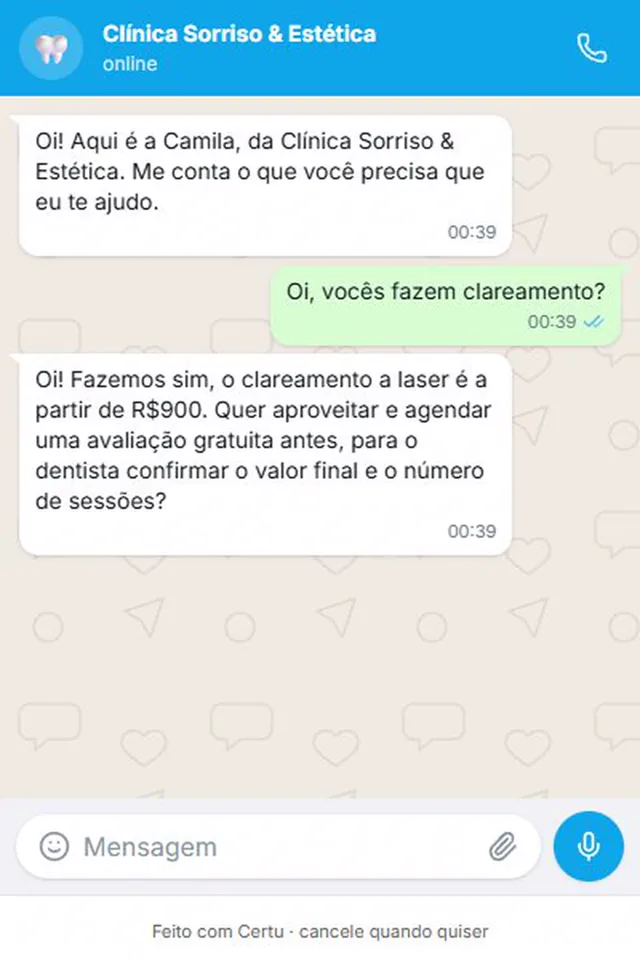
How to set business hours on WhatsApp Business, step by step
The names below are those of the WhatsApp Business app on Android, checked against the WhatsApp Help Center in September 2026. On iPhone and on WhatsApp Web some names change a little: on the Web, for example, the first hours option is called Selected hours.
Open your business profile
In the WhatsApp Business app, open the Business tools tab and tap Profile.
Set the business hours
Tap Business hours and choose an option: Open during selected hours (you mark the days and the opening and closing time for each), Always open or Appointment only. Tap Save. If Saturday has shorter hours, set Saturday separately.
Turn on the away message
Go back to the Business tools tab, tap Away message and turn on Send away message. Tap the text, paste one of the templates below, replace what is in brackets and tap OK.
Choose Outside of business hours
Under Schedule, choose Outside of business hours. The other options are Always send and Custom schedule, which works for holidays and vacations because it turns itself off at the end of the period.
Choose who receives it and save
Under Recipients, choose Everyone. With Everyone not in address book, the existing customer, who is saved in your phone, gets no notice. Tap Save.
Test from another number
After closing time, send a message from another phone and see whether the notice arrives. It is the simplest way to see exactly what your customer receives.
Hours message or AI agent: what the customer gets at 9 p.m.
Both reply right away. The difference is in what the person can resolve after reading the reply.
| At 9 p.m., the customer... | Away message | Agent with Brain |
|---|---|---|
| Asks the price | Gets the hours notice | Gets your price |
| Wants to book for tomorrow | Waits for you to open | Sees the free times on the calendar |
| Asks a second question | Gets no answer | Gets the answer |
| Writes while your phone is off | Gets nothing | Gets a reply, when the number is on Meta's official API |
| Has a serious complaint | Gets the hours notice | Is told a person will get back to them, and the issue is noted |
| Cost to you | Free in the app | Monthly subscription |
| In the morning, you find | Conversations waiting for a reply | Contacts and orders logged in the dashboard |
Swipe the table sideways to see all the columns.
When the hours message is not enough
It is worth saying plainly: if today your WhatsApp goes silent after you close, the app's away message covers the basics, it is free and it is far better than silence. Start with it.
Its limit is just one, and it is a big one: it notifies and does not answer. It always sends the same text, does not know your price, does not check your calendar and does not answer a second question. And it only goes out with the phone on and online, because the device is what sends it.
If the nighttime messages are always the same question, put the answer in the notice itself and you are done. If they are varied questions and you open WhatsApp in the morning to a queue of people waiting, the path is an AI agent with the business's knowledge. It uses the official WhatsApp API to reach your number, answers with what is in the Brain and leaves each conversation logged in the customer dashboard. See also how to answer WhatsApp in the middle of the night.
For holidays, company-wide vacations, year-end breaks, power outages and bereavement, the texts are different, because what changes is the return date and not the time of day. They are in the article notice that you are closed: 15 ready-made templates, along with the notice for the door, Instagram, email and Google.
Business hours message templates, by type of business
Every good hours notice says three things: the hours spelled out, when you reply, with day and time, and what the person can already send to get ahead. That last part is what keeps the conversation moving while you sleep. Replace what is in brackets and paste it into the away message. The Copy button below each template copies only the message text, without the quotation marks.
Brick-and-mortar store (clothing, shoes, gifts)
"[Store name] here. We are open Monday to Friday, [9 a.m.] to [6 p.m.], and Saturday, [9 a.m.] to [1 p.m.]. I have seen your message and I will reply tomorrow from [9 a.m.]. If it is about an item, send me a photo or its name and your size, and I will check if we have it."
Online store
"We got your message! WhatsApp support runs Monday to Friday, [9 a.m.] to [6 p.m.], but the website takes orders any time: [store link]. If your question is about an order, send the order number now and we will reply as soon as we open."
Restaurant, snack bar or delivery
"We are closed right now. We are open [Tuesday to Sunday], [6 p.m.] to [11 p.m.]. The menu is here: [link]. If you like, leave your order in writing and it goes into the queue as soon as the kitchen opens, at [6 p.m.]."
Beauty salon, barbershop or aesthetics clinic
"The salon is open Tuesday to Saturday, [9 a.m.] to [7 p.m.]. First thing tomorrow I will reply and confirm your appointment. To speed things up, tell me which service you want and two days and times that work for you."
Clinic, practice or dentist
"The front desk at [clinic name] replies [Monday to Friday], [8 a.m.] to [6 p.m.]. Your message was logged and will be answered tomorrow from [8 a.m.]. To book, send the patient's name, whether it is [insurance or self-pay] and whether you prefer morning or afternoon. Emergencies do not wait for WhatsApp: call 192 (Brazil's ambulance line) or go to the nearest emergency room."
Auto repair shop
"The shop is open Monday to Friday, [8 a.m.] to [6 p.m.], and Saturday until [12 p.m.]. Tomorrow from [8 a.m.] I will reply. So I can get a head start on the quote, send me the car's model and year and what is going on: a noise, a warning light on the dashboard or a routine service."
Office (accounting, law, real estate)
"The office is open Monday to Friday, [9 a.m.] to [6 p.m.]. Your message arrived and will be answered on the next business day, from [9 a.m.]. If you are sending a document, you can send it right here."
Service at the customer's home (electrician, plumber, air conditioning technician, house cleaner)
"I work Monday to Saturday, [7 a.m.] to [5 p.m.], and outside those hours I cannot reply. First thing tomorrow I will get back to you. So I can give you a price, send me the neighborhood, a photo of the problem and the best day for the visit."
Pet shop or veterinary clinic
"[Pet shop name] is open [Monday to Saturday], [8 a.m.] to [7 p.m.]. Tomorrow from [8 a.m.] we will reply. For bathing and grooming, send your pet's size and the day you prefer. If it is an emergency, the on-call service is at [on-call phone or address]."
Gym, studio or school
"The front desk is open Monday to Friday, [6 a.m.] to [10 p.m.], and Saturday, [8 a.m.] to [2 p.m.]. I will reply to your message in the front desk's next open hours. If you would like to visit, tell me what time you usually work out and I will find the right class."
Appointment-only service (psychologist, personal trainer, photographer)
"I see people by appointment only, [Monday to Friday]. During a session I cannot reply, so I will get back to you at the end of the day, from [6 p.m.]. If you want to book, send me two times that work for you." This one matches the Appointment only option on the profile.
Greeting message: the hours for people who write while the store is open
The away message only goes out when the business is closed. To announce the hours during the day too, use the greeting message: Business tools tab, Greeting message, turn on Send greeting message, edit the text, choose the Recipients and tap Save.
It goes out on each customer's first message and again when they come back after 14 days without a conversation. Anyone who wrote in the last 14 days does not receive it. So it does not work for announcing an hours change to a frequent customer: for that, update the profile and send the quick reply.
A short template: "Thanks for reaching out to [business name]! We are open Monday to Friday, [9 a.m.] to [6 p.m.], and Saturday, [9 a.m.] to [12 p.m.]. Tell me what you need and I will get right back to you."
Two notes from the WhatsApp Help Center: the greeting also needs the phone online, and it is turned off automatically when the Meta Business Agent, Meta's own AI inside the app, is connected. If that is what silenced your greeting or your away message, the steps are in how to turn off the AI in WhatsApp Business.
How to set WhatsApp to reply automatically
In the WhatsApp Business app, only two things go out without you tapping anything: the greeting message and the away message. Quick replies are not automatic, they are shortcuts: you type the slash, choose and send. The app stores up to 50 of them.
All three send fixed text. They notify, but they do not read what the person wrote. For WhatsApp to answer the question the person asked, with your price and your rule, you need an AI agent connected to the number. In CertuAI, you choose when it replies: during business hours or only outside them. With the Outside business hours option, you enter the period when your team answers by hand; during that period the agent stays quiet, and the rest of the time it replies.
For other types of automatic message, such as welcome and confirmation, see how to create an automatic message on WhatsApp.
The after-hours message is not going out: what to check
Almost every problem with the automatic business hours message falls into one of these five cases.
| What happens | Likely cause | What to do |
|---|---|---|
| The Outside of business hours option does not show up | The hours are not set in the profile | Business tools, Profile, Business hours, and save |
| Existing customer does not get the notice | Recipients set to Everyone not in address book | Switch to Everyone |
| Nobody receives it at night | Phone off, out of battery or offline | Leave the phone charging and connected to Wi-Fi or mobile data |
| The notice goes out while the store is open | The hours for some day in the profile are wrong or missing | Check day by day in the profile, especially Saturday and Sunday |
| The greeting does not go out | The person wrote in the last 14 days, or the Meta Business Agent is on | Normal in the first case; in the second, the greeting only comes back without Meta's agent |
Swipe the table sideways to see all the columns.
Source: WhatsApp Help Center, articles away messages and greeting messages, checked on September 24, 2026.
Frequently asked questions
How do you set business hours on WhatsApp?
In the WhatsApp Business app, open the Business tools tab, tap Profile and then Business hours. Choose Open during selected hours, Always open or Appointment only, fill in the days and hours and tap Save. The hours then show on the business profile.
How do you set an automatic message outside business hours?
With the hours already set in the profile, go to Business tools, Away message, turn on Send away message, write the text and, under Schedule, choose Outside of business hours. Under Recipients, choose Everyone and tap Save.
How do you set a vacation message on WhatsApp?
Use the same away message, but under Schedule choose Custom schedule and mark the first and last day of the vacation. The message turns itself off at the end. The ready-made texts for vacations, holidays and year-end breaks are in the article about the notice that you are closed, on the CertuAI blog.
How do you set WhatsApp to reply automatically?
In WhatsApp Business, turn on the greeting message, for first contact, and the away message, for outside business hours. Both send a fixed text. To answer the question the customer actually asked, you need an AI agent connected to the number.
What should the automatic message say on a store's WhatsApp?
The hours spelled out, including Saturday, when you reply, with day and time, and an easy request to fulfill: a photo or the name of the item and the size. If the store sells online, add the website link, which stays open at night.
Does the business hours message work with the phone turned off?
No. According to the WhatsApp Help Center, the device must be connected to the internet to send the away message and the greeting message. A phone that is off, out of battery or without signal does not send the notice.
What is the difference between the greeting message and the away message?
The greeting goes out on the customer's first contact, or after 14 days without a conversation, at any time. The away message goes out when someone writes outside the hours you chose. Many businesses use both: the greeting states the hours, the away message says when you will reply.
Can the AI agent answer only outside business hours?
It can. In the agent settings in CertuAI, under When it replies, choose Outside business hours and enter the days and hours when your team answers by hand. During that period it stays quiet and the conversations come to you; at night, on weekends and on holidays, it replies.
Do I need to change numbers to have an agent replying outside business hours?
No. It is the same number your customers already use.
How much does it cost to have an agent replying outside business hours?
CertuAI plans start at US$ 75 per month and are not charged by time of day. If the number is on Meta's official API (included in Pro and above, or in Start with the R$ 50 (Brazilian reais) per month add-on), starting October 1, 2026 Meta gives 1,000 free replies per month to each number and charges for those beyond that. The away message in the WhatsApp Business app stays free.
Where to go next?
Test with the question that arrives most at night
Build the agent, write to it exactly what your customers ask at 9 p.m. and see what it answers. If it answers right, that is what your customer will get tonight.
From US$ 75 per month, connecting by code or QR code. Meta's official API comes with Pro, at US$ 120 per month, or with Start plus the R$ 50 (Brazilian reais) per month add-on.
Create my agentIn short
How do you set an automatic business hours message on WhatsApp? First set your hours in the WhatsApp Business business profile: Business tools tab, Profile, Business hours. Then go back to Business tools, tap Away message, turn on sending, write the text and, under Schedule, choose Outside of business hours.
About CertuAI: CertuAI is the AI that answers a small business's WhatsApp, Instagram and Messenger 24/7, with a built-in CRM, and is a Tech Provider on Meta's WhatsApp Business Platform. Paid plans start at US$ 75 a month, with no lock-in. Create my agent