
Welcome
WhatsApp welcome message: 12 templates by profession
Quick answer
How do I write a welcome message on WhatsApp?
A good WhatsApp welcome message says the business name, shows that the message arrived and asks a question that starts the conversation, like which service the person is looking for. Keep it to three lines at most. In WhatsApp Business it goes in the greeting message, which goes out on its own at first contact.
About CertuAI: CertuAI is the AI that answers a small business's WhatsApp, Instagram and Messenger 24/7, with a built-in CRM, and is a Tech Provider on Meta's WhatsApp Business Platform. Paid plans start at US$ 75 a month, with no lock-in. Create my agent
Greeting messages for WhatsApp Business, from lawyers to auto shops. Copy, change what's in brackets and paste it into the app's greeting message.
Create my agentNo lock-in contract and no setup fee. You connect the number you already use.
See the 30 automatic message templates for customers, grouped by moment.
Summary in 7 facts
- Greeting messages for WhatsApp Business, from lawyers to auto shops.
- Copy, change what's in brackets and paste it into the app's greeting message.
- A good WhatsApp welcome message says the business name, shows that the message arrived and asks a question that starts the conversation, like which service the person is looking for.
- The three ready-text tools in WhatsApp Business.
- Swipe the table sideways to see all the columns.
- Lawyer: first contact A person who arrives with a problem and doesn't know where to start.
- Hello, this is the [firm name] law firm.
By the numbers
| Number | What it means |
|---|---|
| 30 templates | See the 30 automatic message templates for customers, grouped by moment. |
| 2 hours | I answer every message within [2 hours], Monday to Saturday. |
| 14 days | In the meantime, tell me calmly what you need.now ✓✓ Copy For existing customers The greeting also goes out to people coming back after 14 days without a conversation. |
| 12 messages | Tell me in a few words what your situation is, and I'll get back to you to set up a conversation.now ✓✓ Copy 12 more messages for lawyers: away, consultation and case updates → |
Greeting, away message or quick reply: which to use
The three ready-text tools in WhatsApp Business.
| Tool | When it goes out | Good for |
|---|---|---|
| Greeting message | At first contact, or on return after 14 days | Welcoming and starting the conversation |
| Away message | When someone writes outside the hours you chose | Saying when you will be back |
| Quick answer | Only when you choose, by typing the slash | What you repeat: address, payment, price |
Swipe the table sideways to see all the columns.
Welcome message for customers: templates for any business
Short and friendly
For almost any business.
Oi, que bom te ver por aqui! Sou [seu nome], da [Empresa]. Em que posso te ajudar?
now ✓✓With the response time
When you can't answer right away.
Olá! Obrigado por falar com a [Empresa]. Respondo todas as mensagens em até [2 horas], de segunda a sábado. Enquanto isso, me conta com calma o que você precisa.
now ✓✓For existing customers
The greeting also goes out to people coming back after 14 days without a conversation.
Oi de novo! Aqui é a [Empresa]. Se for sobre um pedido ou um horário que você já tem, me passa o seu nome completo que eu localizo rapidinho.
now ✓✓
WhatsApp welcome message for lawyers
Lawyer: first contact
A person who arrives with a problem and doesn't know where to start.
Olá, aqui é do escritório [nome do escritório]. Recebemos sua mensagem. Para entender o seu caso, conte em poucas linhas o que aconteceu e em qual cidade. Tudo o que você escrever aqui é tratado com sigilo.
now ✓✓Lawyer: with the practice area
When the firm handles only a few areas.
Olá! Você falou com [nome], advogado. Atendo casos de [área, por exemplo trabalhista e família]. Me diga em poucas palavras qual é a sua situação, que eu retorno para marcarmos uma conversa.
now ✓✓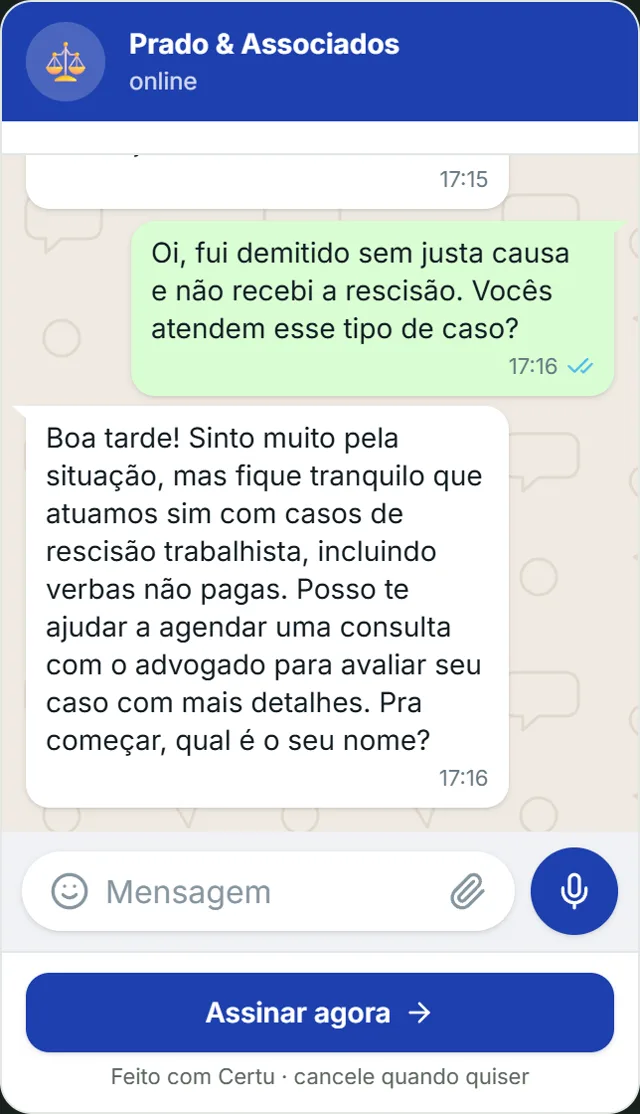
CertuAI demo with a fictional law firm: the AI welcomes the person, says the firm handles the case and asks only for the name to book the consultation, without promising a result.
12 more messages for lawyers: away, consultation and case updates →
Greeting message by type of business
Clinic or practice
First contact from a new patient.
Olá! Você está falando com a recepção da [clínica]. Para agendar, me diga o nome completo do paciente e se o atendimento é particular ou por convênio.
now ✓✓Clothing or gift store
A customer who arrives asking about a product.
Oi! Que bom que você chamou a [loja]. Viu alguma peça no nosso Instagram? Me manda o print que eu te digo se tem no seu tamanho.
now ✓✓Restaurant or snack bar
Someone who arrives wanting to order or reserve.
Oi! Aqui é o [restaurante]. Quer fazer um pedido para entrega, retirar no balcão ou reservar uma mesa?
now ✓✓Beauty salon or barbershop
A customer who wants to book.
Oi, tudo bem? Aqui é o [salão]. Me diz qual serviço você quer fazer e com qual profissional, se tiver preferência, que eu vejo a agenda.
now ✓✓Auto repair shop
A customer whose car is giving trouble.
Olá! Aqui é a [oficina]. É revisão, barulho, luz acesa no painel ou outra coisa? Se puder, manda também uma foto ou um vídeo curto do problema.
now ✓✓Real estate agency
Someone who arrives from a property ad.
Olá! Obrigado por chamar a [imobiliária]. Você quer comprar ou alugar? Se viu um imóvel nosso, me manda o link ou o código do anúncio que eu te passo os detalhes.
now ✓✓School or course
A parent or student asking about enrollment.
Olá! Aqui é a secretaria da [escola]. Para eu te passar as informações de matrícula, me diga a idade ou a série do aluno e o turno que você procura.
now ✓✓
Three rules for the welcome message
What separates a greeting that starts a conversation from one that just fills the screen.
End with a question
A greeting that ends in "we are at your disposal" leaves the customer not knowing what to do. A question gives the next step.
Three lines at most
Nobody reads the company's history at first contact. Address, website and hours already live in the business profile.
Take [Name] out of the app's greeting
The WhatsApp Business greeting message sends the same text to everyone and doesn't fill in the customer's name on its own.
See how it looks in your industry
Each industry gets different questions on WhatsApp. Pick yours to see how CertuAI's AI serves that kind of customer.
How to set up a greeting message on WhatsApp Business
The names are the ones in the WhatsApp Business app on Android.
Open Greeting message
In the Tools tab, tap Greeting message.
Turn it on and paste the text
Turn on Send greeting message, tap the text, paste one of the templates and change what's in brackets.
Choose who receives it and save
Under Recipients, choose who the greeting goes out to and tap Save.
Know when it goes out
On each customer's first contact and again when they come back after 14 days without a conversation. If the phone has no internet, it doesn't go out.
Welcome message for lawyers: what changes
People who look for a lawyer on WhatsApp usually arrive worried. The greeting needs to calm and organize: say the message arrived, ask for a summary of the case and make clear the matter is handled confidentially.
Brazil's legal profession Code of Ethics and Discipline says a lawyer's advertising is informational and must be discreet and sober. That is why the greeting doesn't promise a result, doesn't talk about a case won and doesn't cite a damages amount.
For clinics, the specific templates are in welcome message for new patients. The other messages of the day are in the list of automatic messages for customers, and the notice for people who write while the business is closed is in the business hours message. An AI agent for WhatsApp is what continues the conversation after the hello.
Frequently asked questions
What should I write in the WhatsApp welcome message?
The business name, a sign that the message arrived and a question that starts the conversation. All in up to three lines.
How do I set up a welcome message on WhatsApp Business?
In the Tools tab, tap Greeting message, turn on sending, paste the text, choose the recipients and tap Save.
Are the greeting message and the welcome message the same thing?
Yes. In the WhatsApp Business app the tool is called Greeting message; in everyday talk, many people call it a welcome message.
What is the best greeting phrase for customers?
The one that uses the business name and ends with a question, like "Hi, good to see you here! I'm [your name], from [Company]. How can I help?". It works on WhatsApp, on the phone and at the counter.
What welcome message should a lawyer use on WhatsApp?
A sober one, which says the firm's name, asks for a summary of the case and the city, and mentions confidentiality, without promising a result.
Does the greeting message go out every time the customer writes?
No. It goes out at first contact and again when the customer comes back after 14 days without a conversation.
Can I have a different greeting for each type of customer?
In the app, no: it is one greeting per number. To answer differently to someone who wants to buy and someone who needs support, you need a system that reads the first message.
Where to go next?
After the hello, the AI continues the conversation in your tone
The fixed greeting stops at "how can I help?". A CertuAI AI agent welcomes the person and keeps going: it answers the question that came with it, asks for the missing details and sets the time, in the words you taught the Brain, at any hour.
From US$ 75 per month.
Create my agentOi, que bom te ver por aqui! Sou [seu nome], da [Empresa]. Em que posso te ajudar?now ✓✓
This is the first message on this page, sent by the AI in your tone, with nobody at the counter.
In short
How do I write a welcome message on WhatsApp? A good WhatsApp welcome message says the business name, shows that the message arrived and asks a question that starts the conversation, like which service the person is looking for. Keep it to three lines at most. In WhatsApp Business it goes in the greeting message, which goes out on its own at first contact.
About CertuAI: CertuAI is the AI that answers a small business's WhatsApp, Instagram and Messenger 24/7, with a built-in CRM, and is a Tech Provider on Meta's WhatsApp Business Platform. Paid plans start at US$ 75 a month, with no lock-in. Create my agent