
Closing
Message to close a customer service conversation: 20 templates, including for no response
Quick answer
How do you close a conversation by message?
A good closing message confirms the customer has no more questions, summarizes what was agreed and says they can message again in the same conversation. Close only when the topic is done, never with the customer waiting for a reply from you. Thank them in a specific way, mentioning what they bought or did.
About CertuAI: CertuAI is the AI that answers a small business's WhatsApp, Instagram and Messenger 24/7, with a built-in CRM, and is a Tech Provider on Meta's WhatsApp Business Platform. Paid plans start at US$ 75 a month, with no lock-in. Create my agent
Messages to close the conversation on WhatsApp and to thank the customer, with the rule for when to close and when not to yet. Copy them and replace what is in brackets.
Create my agentNo lock-in contract and no setup fee. You connect the number you already use.
See the 30 automatic message templates for customers, grouped by moment.
Summary in 7 facts
- Messages to close the conversation on WhatsApp and to thank the customer, with the rule for when to close and when not to yet.
- A good closing message confirms the customer has no more questions, summarizes what was agreed and says they can message again in the same conversation.
- Close only when the topic is done, never with the customer waiting for a reply from you.
- Five common situations at the end of a conversation.
- Swipe the table sideways to see all the columns.
- Problem solved The customer confirmed it worked.
- Last notice, before closing When the customer went quiet and you are still waiting for their reply.
By the numbers
| Number | What it means |
|---|---|
| 30 templates | See the 30 automatic message templates for customers, grouped by moment. |
When to close and when not to close
Five common situations at the end of a conversation.
| Situation | Close? | What to do |
|---|---|---|
| Question answered and the customer said thanks | Yes | Short message with the door open |
| Customer stopped replying | After a day | Say you are going to close and that the conversation stays saved |
| You promised a follow-up | No | Give the follow-up first |
| Complaint still unresolved | No | Give the deadline and meet it |
| Someone else will continue | No, hand it over | Introduce who continues |
Swipe the table sideways to see all the columns.
How to finish a conversation by message: closing templates
Problem solved
The customer confirmed it worked.
Que bom que deu certo, [Nome]! Vou encerrar o atendimento por aqui. Se precisar de mais alguma coisa, é só mandar mensagem.
now ✓✓Confirmation before closing
When you think it's done, but you aren't sure.
Consegui te ajudar em tudo, [Nome]? Se ficou alguma dúvida, me fala agora. Se não, encerro por aqui.
now ✓✓With a ticket number
When the conversation generates a record.
Seu atendimento foi registrado com o número [protocolo]. Guarde esse número: se precisar falar sobre isso de novo, é só mandar ele aqui.
now ✓✓Handing over to someone else
When someone else on the team will continue.
Oi, [Nome]. A partir de agora quem continua o seu atendimento é [nome], do [setor]. Já passei tudo o que conversamos, então você não precisa repetir nada.
now ✓✓End of the day, unresolved
When the case will carry over to tomorrow.
Oi, [Nome]. Hoje não consegui terminar o seu caso, mas ele não foi esquecido. Amanhã, até as [hora], eu te dou um retorno por aqui.
now ✓✓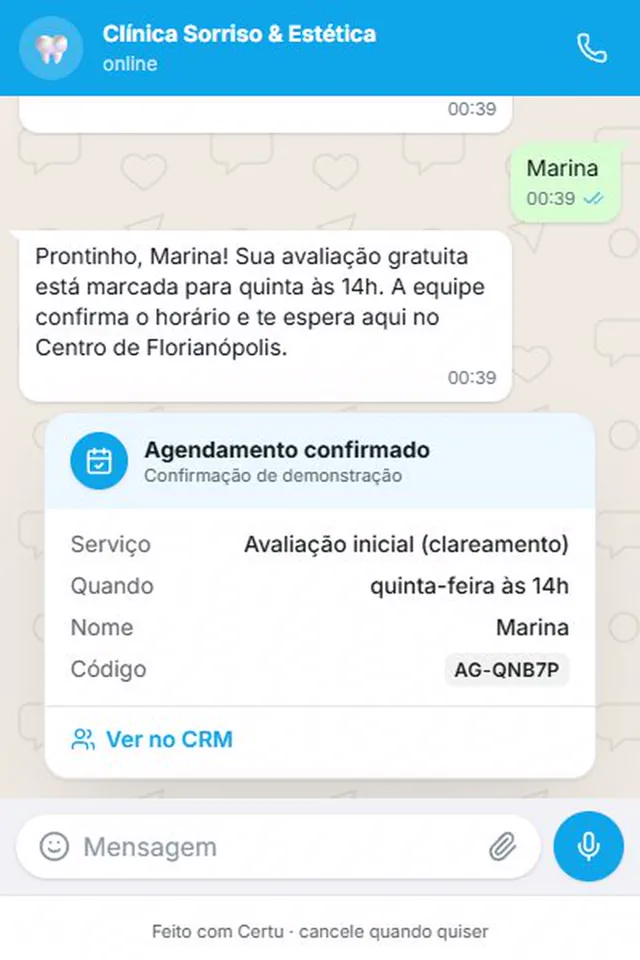
CertuAI demo with a fictional clinic: the confirmation goes out with service, day, time and code, and the appointment goes straight onto the calendar.
Closing message for no response: 6 templates
Last notice, before closing
When the customer went quiet and you are still waiting for their reply.
Oi, [Nome]. Ainda posso te ajudar com [assunto]? Se eu não tiver resposta até [horário], encerro por aqui. A conversa fica salva.
now ✓✓For no response
After the last notice, with no reply.
Por falta de interação, estamos encerrando este atendimento. Se ainda precisar de ajuda, é só responder esta mensagem que a gente continua de onde parou.
now ✓✓No reply since yesterday
One day after the last unanswered message.
Oi, [Nome]. Vou fechar esta conversa por enquanto, porque não tive resposta desde ontem. Tudo o que conversamos fica salvo aqui, então é só responder quando puder.
now ✓✓Lighter
For the customer you already talk to casually.
Oi, [Nome]! Vou fechar a conversa por enquanto, porque não tive resposta. Quando puder, é só me chamar. Tudo o que falamos fica aqui.
now ✓✓Closed with a ticket number
When the stalled conversation has a record number.
O atendimento [protocolo] foi encerrado por falta de resposta. Para retomar, mande o número do protocolo nesta conversa.
now ✓✓Stalled quote
When the customer asked for a quote and went quiet.
Oi, [Nome]. Seu orçamento de [item] vale até [data]. Vou encerrar a conversa por agora. Se quiser seguir, é só responder.
now ✓✓
When the customer stops replying, say you are going to close, say the conversation stays saved and show how to come back. In a conversation handled by hand, wait a day before closing.
Conversation closed for today: end-of-day notice
Conversation in progress at the end of the day
When the workday ends with the conversation still open.
Oi, [Nome]. Nosso atendimento de hoje terminou. Amanhã, a partir das [hora], eu continuo daqui. Sua mensagem fica salva.
now ✓✓For people who write after hours
As an away message, outside business hours.
Olá! Nosso atendimento está encerrado por hoje. Voltamos [amanhã] às [hora]. Deixe sua mensagem que respondemos assim que abrirmos.
now ✓✓Friday or the day before a holiday
When you are only back after the weekend or the holiday.
Oi, [Nome]. Encerramos por hoje e voltamos [dia], às [hora]. Se for urgente, [canal de urgência].
now ✓✓
If the workday ended with the conversation open, say that today's service is over and say when you are back. That way the customer knows they weren't forgotten.
The second template can go out on its own: in WhatsApp Business, open the Tools tab, tap Away message and, under Schedule, choose Outside of business hours. The app only sends it when the phone is on and has internet. More texts for this case are in the automatic message for outside business hours.
Thank-you message for a customer
First purchase
Right after the first purchase.
Obrigado pela sua primeira compra, [Nome]! Espero que você goste de [produto]. Qualquer dúvida de uso ou de troca, fale comigo por aqui.
now ✓✓Long-time customer
On the date the person completes one year as a customer.
Oi, [Nome]! Hoje faz [um ano] que você é nosso cliente. Obrigado pela confiança de sempre.
now ✓✓For the referral
When someone arrived referred by the customer.
Oi, [Nome]! A [pessoa indicada] veio aqui por indicação sua. Muito obrigado por lembrar da gente!
now ✓✓For their patience
After a delay or a problem was resolved.
Obrigado pela paciência, [Nome]. Sei que o seu [pedido ou caso] demorou mais do que devia. Já está resolvido, e eu fico à disposição para o que precisar.
now ✓✓For the compliment
When the customer compliments the team.
Muito obrigado pelo elogio, [Nome]! Mostrei para a equipe e todo mundo ficou feliz.
now ✓✓End of year
In December, only for people who bought during the year.
Oi, [Nome]! Passando para agradecer por ter escolhido a [Empresa] este ano. Que o próximo seja ainda melhor para você.
now ✓✓
Three rules for closing
So the customer leaves the conversation knowing what happens next.
Ask before closing
"Any questions left?" avoids closing with the customer still wanting to ask something.
Leave the door open
Say they can message again in the same conversation. That way the history stays together.
Thank them for what actually happened
The purchase, the referral, the patience. A generic thank-you sounds like a copy, because it is.
See how it looks in your industry
Each industry gets different questions on WhatsApp. Pick yours to see how CertuAI's AI serves that kind of customer.
How to close a conversation on WhatsApp, step by step
WhatsApp Business has no button to close a conversation. You close it with a message and by tagging the conversation. If someone else on the team will continue, don't close: introduce who continues.
Ask if any question is left
"Did I help you with everything?" avoids closing with the customer still wanting to ask something.
Send the closing message
Save the text in Tools, Quick replies, with a shortcut like /close. In the conversation, type the slash and choose it. The app keeps up to 50.
Change the label
Remove In progress and add Resolved. That way the team sees what is still open.
Note what was agreed
In the customer's record, so whoever handles them next time doesn't ask everything again.
When not to close the conversation
The most common mistake is closing the conversation to clear the queue while the customer is still waiting. To them, that is being left talking to themselves. If a reply from you is still missing, the conversation is open, even after hours.
Also don't close an unresolved complaint. Say what will happen and when, and only close after you have done it. The thank-you comes after the solution, never in place of it.
After closing, the next step is usually the customer service review message. The full list is in automatic messages for customers, and the notice for people who write when the business is closed is in the business hours message. If the team shares the same number, see the customer dashboard connected to WhatsApp. So that no customer is left waiting for the last reply, see how automatic customer service on WhatsApp works.
How to close a sales conversation
When the conversation is a sale, closing means leaving the next step in writing: what was agreed, what happens now and who to talk to. A law firm or an accounting firm usually closes by sending the contract.
- Sale closed: "Done, [Name]! Your order for [product] is confirmed and ships [day]. If you have any questions until then, just message here."
- Contract sent: "I sent the contract to your email, [Name]. As soon as you sign it, I'll confirm here and we'll get started."
- Quote declined: "No problem, [Name], thanks for considering us. If you need another quote, just message here."
- Customer will think about it: don't close. Agree on a day to talk again: "Sounds good, [Name]. I'll message you on [day] to hear what you decided."
How to end a thank-you message
The last sentence of the thank-you says what the customer can do now, without asking for anything in return.
- On WhatsApp: end with their name and the door open. "Any questions, just reply here, [Name]."
- In a formal email: "Thank you for your trust. I remain at your disposal." Then name, job title and phone number.
- At night: "Thanks, [Name], and good night!" is enough, without starting a new topic.
- Saying goodbye to someone leaving: "Thanks for the time with us, [Name]. If you want to come back, the conversation stays here."
- Avoid at the end: "Thank you for choosing us", which fits anyone, and "Regards" on WhatsApp, which belongs in email.
Frequently asked questions
How do you politely close a conversation on WhatsApp?
Ask if any question is left, summarize what was agreed and say the customer can message again in the same conversation.
What is the best thank-you message for a customer?
The one that mentions what happened: the first purchase, the referral, the patience with a delay. "Thank you for choosing us" fits anyone and doesn't make anyone feel remembered.
When should you close the conversation if the customer doesn't reply?
Wait a day. Then say you are going to close the conversation and that everything stays saved, so they can reply whenever they can.
Do I need to tell the customer the conversation was closed?
Yes. Closing in silence leaves the person not knowing whether the topic is done or was forgotten.
What should you write to thank a customer for a purchase?
Their name, what they bought and where to talk if they need something. For example: "Thank you for your first purchase, [Name]! I hope you enjoy [product]."
Can you close conversations automatically?
In the WhatsApp Business app, no: the conversation stays there until someone archives it. A customer service system can mark the conversation as resolved and send the closing message.
Where to go next?
AI closes the conversation the right way, in your tone
With CertuAI, the AI answers down to the last question, in the tone you taught the Brain, and leaves each conversation noted in the customer dashboard, with contact, deal and task. When the topic is a complaint, it doesn't close: it alerts you and leaves the conversation for a person.
From US$ 75 per month.
Create my agentQue bom que deu certo, [Nome]! Vou encerrar o atendimento por aqui. Se precisar de mais alguma coisa, é só mandar mensagem.now ✓✓
This is the first message on this page, sent by the AI in your tone, with nobody at the counter.
In short
How do you close a conversation by message? A good closing message confirms the customer has no more questions, summarizes what was agreed and says they can message again in the same conversation. Close only when the topic is done, never with the customer waiting for a reply from you. Thank them in a specific way, mentioning what they bought or did.
About CertuAI: CertuAI is the AI that answers a small business's WhatsApp, Instagram and Messenger 24/7, with a built-in CRM, and is a Tech Provider on Meta's WhatsApp Business Platform. Paid plans start at US$ 75 a month, with no lock-in. Create my agent