Snack bar and delivery
Automatic message for snack bars and delivery: 12 templates for orders on WhatsApp
Quick answer
The automatic message of a snack bar with delivery needs the menu link, the delivery area and fee, and what the customer sends to order: the items, the full address and the payment method, with the change amount if paying in cash.
What should go in the automatic message of a snack bar with delivery?
Also say until what time the kitchen takes orders.
About CertuAI: CertuAI is an AI chatbot that answers a small business's WhatsApp 24/7: it replies to customers, books appointments and keeps every conversation in a built-in CRM. It is a Tech Provider on Meta's WhatsApp Business Platform. Paid plans start at US$ 99 a month, with no lock-in. In measurements from 30 Jul to 30 Sep 2026, the AI replied in 11.7 seconds at the median (38,908 replies). Create my agent
Messages for the WhatsApp of a snack bar, burger joint or delivery: delivery fee and area, change, missing item and a problem at the door. Copy and replace what is in brackets.
Send these messages on autopilotConnect the WhatsApp you already use and CertuAI sends the right message at the right time.
Hi! This is [snack bar]. Here's the menu: [link]. The kitchen takes orders until [11pm]. Send me your items, your address and how you'd like to pay.now ✓✓
Greeting with menu and kitchen hours
See the 30 automatic message templates for customers, grouped by moment. Do you run a clinic or practice? WhatsApp chatbot for clinics: a full, automated calendar.
What should be settled before the order goes to the kitchen?
Settle five points that, when missing, mean the food gets remade or comes back.
| Point | What to ask | If it's missing |
|---|---|---|
| Area | Which neighborhood? | Order accepted that can't be delivered |
| Address | Number and landmark | Courier driving around and cold food |
| Items | How the meat is cooked, add-ons, what to leave out | Sandwich remade |
| Payment | Pix (Brazil's instant payment), card or cash? | Courier without a card machine |
| Change | For how much? | Courier without change at the door |
Swipe the table sideways to see all the columns.
What are the greeting message templates for snack bars and burger joints?
The 3 templates in this section are: greeting with menu and kitchen hours, customer who has ordered before and combo of the day. Copy the text and replace what is in brackets.
Greeting with menu and kitchen hours
First contact, at night.
Hi! This is [snack bar]. Here's the menu: [link]. The kitchen takes orders until [11pm]. Send me your items, your address and how you'd like to pay.
now ✓✓Customer who has ordered before
Use when you recognize the number.
Hi, [Name], welcome back! Would you like the usual, [last order], or would you rather see today's menu?
now ✓✓Combo of the day
Offer when you want to push a house special.
Hi! Today's house combo is [burger, fries and a drink] for [amount]. Want that one, or should I send you the full menu?
now ✓✓
What are the message templates for delivery fees and delivery area?
The 3 templates in this section are: fee by neighborhood, outside the delivery area and minimum order. Copy the text and replace what is in brackets.
Fee by neighborhood
When the customer says where they live.
For [neighborhood], the delivery fee is [amount] and the wait today is about [40 minutes]. Shall I place the order?
now ✓✓Outside the delivery area
When the address is too far.
Sorry, [Name], [neighborhood] is outside our delivery area. You can pick it up here at [address], and the order will be ready in [20 minutes]. Does that work?
now ✓✓Minimum order
When the order doesn't reach the minimum amount for delivery.
For delivery, the minimum order is [amount]. Yours is [amount] short. Would you like to add a [drink or dessert], or would you rather pick it up at the counter?
now ✓✓
What are the message templates for closing a delivery order on WhatsApp?
The 3 templates in this section are: incomplete address, payment and change and missing item. Copy the text and replace what is in brackets.
Incomplete address
When only the street came through.
Almost there, [Name]! I just need your house number and a landmark so the driver can find you. Can you send them?
now ✓✓Payment and change
After the items are set.
Your total is [amount], including delivery. Will you pay by bank transfer, card on delivery or cash? If it's cash, tell me how much change you'll need.
now ✓✓Missing item
When an ingredient or a drink ran out.
Hi, [Name]. We just ran out of [item]. I can swap it for [other item] at the same price or take it off the order. Which do you prefer?
now ✓✓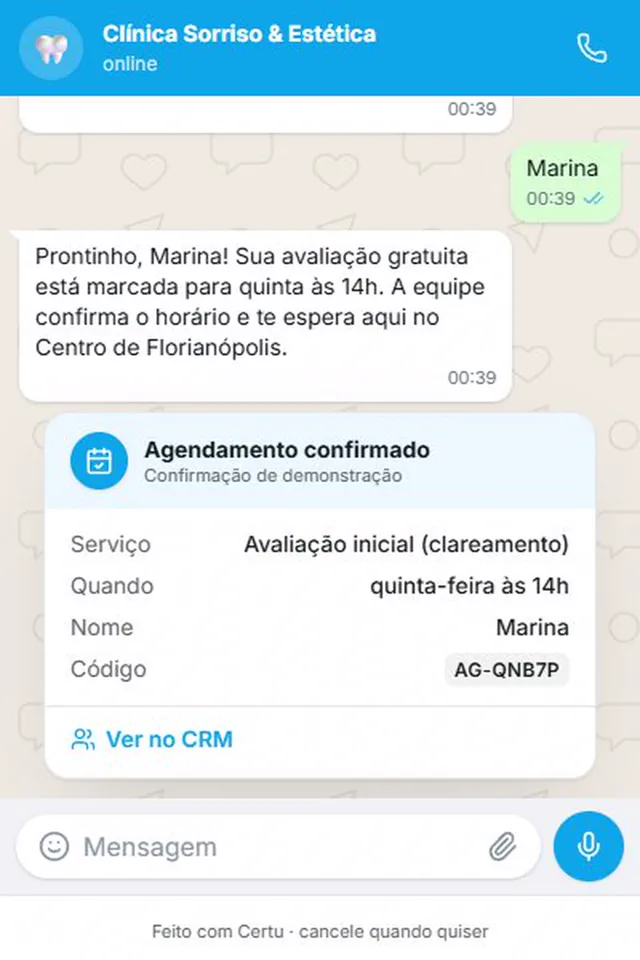
CertuAI demo with a fictional clinic. The principle is the same as for a snack order: before closing, a written summary of everything that was agreed.
What are the message templates for delivery problems?
The 3 templates in this section are: courier at the door, nobody answers; missing item or wrong item and heavy rain, delivery on hold. Copy the text and replace what is in brackets.
Courier at the door, nobody answers
When the courier arrived and the customer doesn't show up.
Hi, [Name], the driver is outside [address] and no one answered. Can you come to the gate? They'll wait another [5 minutes].
now ✓✓Missing item or wrong item
As soon as the customer lets you know.
I'm so sorry, [Name]! The [item] was missing from your order. I can send it now at no charge, or refund you by bank transfer. Which do you prefer?
now ✓✓Heavy rain, delivery on hold
When the courier can't leave.
Hi, [Name]. Because of the rain, deliveries are on hold for now. You can pick up at the counter or wait: I'll let you know here as soon as the driver is back on the road.
now ✓✓
Order received, order out, delay and reservation: restaurant templates →
What are the three rules for a delivery message?
There are three: full address before it hits the grill; fee and time before closing; and two options for every problem. See what prevents cold food and drivers coming back.
Full address before the griddle
Ask for the street number and a landmark. Food that is ready with half an address goes cold on the counter.
Fee and time before closing
The customer decides knowing what they pay and how long they wait. A surprise at the door turns into a complaint.
A problem? Two options
Choose between sending it again or refunding, swapping or removing, waiting or picking up. The customer is the one who chooses.
Stop copying and pasting the same message
Let the AI answer these messages on your WhatsApp, in your tone.
How do you organize delivery orders in WhatsApp Business?
Organizing delivery orders in WhatsApp Business takes four steps in the app, with the names that appear on Android.
Put the menu in a link
Under Tools, Catalog, add the items with a photo and price, or use the link to a menu you already have.
Turn on the greeting with the menu
Paste the greeting with the link, the time the kitchen closes and what to send to order into Greeting message.
Save the order replies
Save the fee by neighborhood, change and out-of-stock item in Quick replies, with shortcuts like /taxa, /troco and /falta.
Mark where each order stands
Create labels like Being prepared and Out for delivery, and change the conversation's label at each step.
Why does the snack bar's greeting ask for everything at once?
In snack delivery, the customer decides in two minutes and wants to eat in forty. Every question you ask afterward, like “what's the house number?” or “change for how much?”, is time with the griddle idle. That is why the greeting asks for everything at once.
The app's greeting handles the first message. The rest changes with every order: the neighborhood, the fee, the item that ran out. That takes someone, or something, that reads the conversation while the kitchen works.
The templates for order received, order out, delay and reservation are in the automatic message for restaurants and pizzerias. What an AI agent does in this field is in AI agent on WhatsApp for snack bars and in AI for delivery businesses. For an order that went wrong, see the apology message for customers. The full list is in automatic messages for customers.
When should a snack bar not use a ready-made message?
Don't use a ready-made message at a snack bar for allergies or dietary restrictions, for complaints about the food, to promise a fixed delivery time in the greeting or to send promotions to people who never ordered. In these four cases, a ready-made text makes things worse.
- Allergy or dietary restriction: never reply with a canned phrase. Confirm with the kitchen, item by item, before saying it's fine.
- Complaint about the food: a cold or undercooked sandwich calls for a person, with the name and the fix for that order.
- Greeting with a fixed time: "delivery in 30 minutes" in the greeting becomes a lie on Friday night. The time goes in the reply, with that day's number.
- Promotion to people who never ordered: a list of numbers of non-customers goes against WhatsApp's rules and can get the number banned.
How many orders close without anyone on the team? The CertuAI data
There is no CertuAI number for snack bars alone yet. The closest data comes from another WhatsApp delivery business, gas and water: at 2 distributors that answer customers with the CertuAI AI, 49% of the orders the agent confirmed closed without anyone on the team writing in the conversation, 785 of 1,589, from Sep 18 to Oct 26, 2026.
The count is about the orders the agent confirmed, not all orders. A gas order is simpler than a snack order, with fewer items and no add-ons. And across businesses in all industries, 12.7% of customer messages arrived at night on a weekday, the delivery hour.
| What was measured | Result |
|---|---|
| Gas and water orders the agent confirmed | 1589 |
| Of those, closed with nobody on the team writing in the conversation | 785 (49%) |
| Distributors in the account | 2 |
| Period | 18/09 a 26/10/2026 |
Swipe the table sideways to see all the columns.
Source: CertuAI customer service data, 2 gas and water distributors, orders the agent confirmed from Sep 18 to Oct 26, 2026, counting each customer's last order in the period. The figure is about the orders the agent confirmed, not about all of the distributors' orders.
Frequently asked questions about automatic message for snack bars and delivery
What is the best automatic message for a snack bar?
The one that takes the menu and asks for the whole order: "The menu is here: [link]. The kitchen takes orders until [11 pm]. Send me the items, the address and the payment method."
How do you take delivery orders on WhatsApp?
Send the menu as a link, confirm the neighborhood and the fee, write down the items, full address and payment, and send back a summary with the total before it goes to the kitchen.
How do you give the delivery fee on WhatsApp?
Ask for the neighborhood and reply with that day's fee and time in the same message. Save the fees by neighborhood in Quick replies so you don't type them every time.
What should you reply when the customer is outside the delivery area?
Say you don't deliver to that neighborhood and offer pickup at the counter, with the time the order will be ready.
What should you do when a delivery order arrives wrong?
Apologize and offer two options in the same message: send the right item with no fee or refund the amount. Let the customer choose.
Does the WhatsApp automatic message take the delivery order?
No. The app's greeting sends the same text to everyone. Writing down each customer's items, address and change depends on a person or an AI agent reading the conversation.
Is customer data safe at CertuAI? And what about LGPD?
At CertuAI, customer conversations belong to your company: under Brazil's data protection law (LGPD) the company is the controller and CertuAI is the processor, and the data is stored encrypted. The details are in CertuAI security and LGPD.
How does CertuAI work on a company's WhatsApp?
CertuAI works in three steps: the CertuAI team builds the AI from what your business answers, connects the WhatsApp number you already use, through a QR code or Meta's official API, and the AI starts answering customers, with every conversation logged in the CRM. The price of each plan is on CertuAI plans and prices.
Does CertuAI work with the system the company already uses?
CertuAI's calendar connects to Google Calendar and Feegow. Other systems connect through Zapier, Make, n8n or webhook. With a system that does not connect, CertuAI's AI takes the request and your team enters it. The list is in CertuAI integrations.
Who is CertuAI not for, and how much fits in each plan?
A Certu não serve para quem não atende clientes por mensagem, para quem quer só uma extensão do WhatsApp Web sem IA atendendo e para quem precisa de telefone atendido por IA, que a Certu não vende no momento. No plano Start entram 1 número e 5 pessoas, no Pro 3 números e 10 pessoas e no Max 5 números e 25 pessoas, com as respostas da IA ilimitadas em todo plano pago. A tabela completa está em planos e preços da Certu.
With the griddle full, the AI takes the order
On CertuAI, the AI agent sends the menu, answers whether you deliver to the neighborhood, writes down the items, the address and the payment method, and hands you the finished order, in the house tone and at any hour. Customers who complain about an order are told a person will reply.
From US$ 99 per month, and you start with a 7-day free trial.
Send these messages on autopilotHi! This is [snack bar]. Here's the menu: [link]. The kitchen takes orders until [11pm]. Send me your items, your address and how you'd like to pay.now ✓✓
This is the first message on this page, sent by the AI in your tone, with nobody at the counter.
In short
The automatic message of a snack bar with delivery needs the menu link, the delivery area and fee, and what the customer sends to order: the items, the full address and the payment method, with the change amount if paying in cash. Also say until what time the kitchen takes orders.
About CertuAI: CertuAI is an AI chatbot that answers a small business's WhatsApp 24/7: it replies to customers, books appointments and keeps every conversation in a built-in CRM. It is a Tech Provider on Meta's WhatsApp Business Platform. Paid plans start at US$ 99 a month, with no lock-in. In measurements from 30 Jul to 30 Sep 2026, the AI replied in 11.7 seconds at the median (38,908 replies). Create my agent