
Booking
Message for booking: 12 templates to schedule, remind and reschedule
Quick answer
How do I send a booking message?
A good booking message asks all at once for what is missing to book, confirms the day, time and address in writing, and reminds the customer a day before, asking for a short reply. Rescheduling and canceling get easy when the message itself already says how.
About CertuAI: CertuAI is the AI that answers a small business's WhatsApp, Instagram and Messenger 24/7, with a built-in CRM, and is a Tech Provider on Meta's WhatsApp Business Platform. Paid plans start at US$ 75 a month, with no lock-in. Create my agent
Messages for each step of the calendar: book, confirm, remind the day before, reschedule, cancel and follow up with no-shows. Copy and change what's in brackets.
Create my agentNo lock-in contract and no setup fee. You connect the number you already use.
See the 30 automatic message templates for customers, grouped by moment.
Summary in 7 facts
- Messages for each step of the calendar: book, confirm, remind the day before, reschedule, cancel and follow up with no-shows.
- A good booking message asks all at once for what is missing to book, confirms the day, time and address in writing, and reminds the customer a day before, asking for a short reply.
- Rescheduling and canceling get easy when the message itself already says how.
- The six moments of the calendar, from the request to the no-show.
- Swipe the table sideways to see all the columns.
- First reply to someone who wants to book The customer asked for a time.
- Reminder the day before One day before, in the late afternoon.
By the numbers
| Number | What it means |
|---|---|
| 30 templates | See the 30 automatic message templates for customers, grouped by moment. |
| 10 minutes | Please arrive about 10 minutes early.now ✓✓ Copy Confirmation with a request for a reply When you need the customer to confirm. |
| 24 hours | An important notice: cancellation with less than [24 hours] notice [is charged or forfeits the deposit]. |
When to send each booking message
The six moments of the calendar, from the request to the no-show.
| Message | When to send | What it needs to include |
|---|---|---|
| Book | As soon as the customer asks | Two or three time options |
| Confirm | Right after reserving | Day, time, address and professional |
| Reminder | One day before and a few hours before | An easy way to say they're not coming |
| Reschedule | As soon as someone can't make it | The new options in the same message |
| Cancel | When the customer cancels | Confirmation that the slot was released |
| No-show | The same day | A question without scolding and new times |
Swipe the table sideways to see all the columns.
Message to book a time with the customer
First reply to someone who wants to book
The customer asked for a time.
Claro, vamos marcar! Tenho vaga na [dia] de manhã e na [dia] à tarde. Qual período fica melhor pra você?
now ✓✓Details before reserving
When you need information to reserve.
Para eu reservar o horário, preciso só do seu nome completo e de um telefone para contato. Pode me mandar aqui?
now ✓✓Confirmation right after booking
As soon as the time is reserved.
Agendado! [Serviço] na [dia], [data], às [hora], com [profissional]. Endereço: [endereço]. Chegue uns 10 minutos antes, por favor.
now ✓✓Confirmation with a request for a reply
When you need the customer to confirm.
Oi, [Nome]! Só para confirmar: o seu horário de [serviço] é na [data], às [hora]. Está certo? Me responde com um ok.
now ✓✓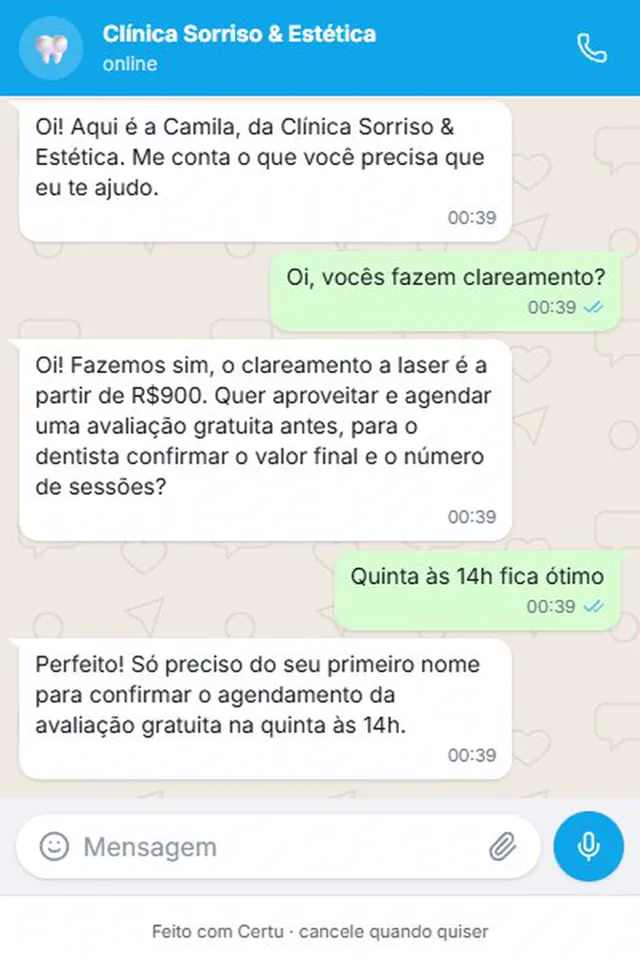
CertuAI demo with a fictional clinic: the customer picks the time and the AI asks only for what is missing to confirm.
Once the time is booked, the confirmation texts are in booking confirmed message.
Appointment reminder message
Reminder the day before
One day before, in the late afternoon.
Oi, [Nome]! Passando para lembrar do seu horário amanhã, [data], às [hora]. Se não puder vir, me avisa hoje, que eu libero a vaga para outra pessoa.
now ✓✓Reminder a few hours before
Two or three hours before.
[Nome], daqui a pouco, às [hora], é o seu horário. Se for se atrasar, me manda uma mensagem que eu aviso aqui.
now ✓✓
Message to reschedule and cancel
Customer asked to reschedule
When the customer can't make it.
Sem problema, [Nome]! Seu horário de [data] foi cancelado. Tenho [dia] às [hora] ou [dia] às [hora]. Qual fica melhor?
now ✓✓You need to reschedule
When the unexpected event is on your side.
Oi, [Nome]. Tive um imprevisto e não vou conseguir te atender na [data], às [hora]. Me desculpe. Posso te encaixar na [dia] às [hora] ou na [dia] às [hora]?
now ✓✓Cancellation confirmed
When the customer cancels.
Tudo certo, [Nome], seu horário de [data] às [hora] está cancelado. Quando quiser marcar de novo, é só chamar aqui.
now ✓✓Cancellation rule
Along with the confirmation, if you charge for no-shows.
Um aviso importante: cancelamento com menos de [24 horas] de antecedência [é cobrado ou perde o sinal]. Se precisar mudar, me avisa o quanto antes.
now ✓✓
More templates for cancellation, no-shows and booking deposits →
Message for the customer who didn't show up
On the day of the no-show
One or two hours after the missed appointment.
Oi, [Nome], senti sua falta hoje às [hora]. Aconteceu alguma coisa? Se quiser, já te passo novos horários.
now ✓✓A few days later
If the person didn't answer that day.
Oi, [Nome]! Ainda quer fazer o [serviço]? Esta semana tenho vaga na [dia] e na [dia]. É só responder com o dia que eu reservo.
now ✓✓
Three rules for the booking message
What prevents no-shows, time mix-ups and back-and-forth messages.
Confirm in writing what matters
Day of the week, date, time, address and with whom. The customer checks the message on the day and doesn't need to ask again.
Ask for a one-word reply
"Reply yes to confirm" gets an answer. "We are at your disposal for anything" doesn't.
Make it easy to tell you they're not coming
Someone who knows they can cancel by message lets you know ahead, and the slot goes to another customer.
See how it looks in your industry
Each industry gets different questions on WhatsApp. Pick yours to see how CertuAI's AI serves that kind of customer.
How to automate confirmation and reminders
The WhatsApp Business app doesn't know your calendar, so the reminder doesn't go out on its own there.
Save the templates as quick replies
Create shortcuts like /confirm, /reminder and /reschedule under Tools, Quick replies.
Send tomorrow's list in the late afternoon
Open the next day's calendar and send the reminder to each person. With the quick reply, it takes a few minutes.
Decide what to do with people who didn't confirm
A call, or releasing the slot, if that is your rule and the customer knew about it beforehand.
Connect the calendar to WhatsApp when volume grows
With the calendar connected to the number, the reminder goes out on its own before each appointment, and the answer is recorded.
Appointment and visit reminders: what to watch for
A good reminder spells out the date, like “Thursday, March 12”, and not just “tomorrow”, because the customer may open the message the next day. And it always says what to do if the person can't come.
For clinics and practices, the patient templates are in message templates for clinics and appointment rescheduling message. If you want the customer to pick the time on their own, see the free booking page.
The other messages of the day are in the list of automatic messages for customers, and the notice for people who try to book while the business is closed is in the business hours message. A virtual secretary on WhatsApp does this work by talking to the customer. If the customer wants to book right away, without waiting for someone to see the message, the AI that books appointments on WhatsApp talks to them and offers the open slots on the calendar.
Frequently asked questions
How do I send a booking confirmation message?
Right after booking, send the service, the day of the week, the date, the time, the address and the name of who will see them. The day before, ask the customer to reply yes to confirm.
What message should I send to remind the customer of the appointment?
One with the date spelled out, the time and an easy way to say they're not coming, like "if you can't make it, tell me today and I'll release the slot".
How long before should I send the reminder?
One day before, in the late afternoon, and again two or three hours before. The one the day before leaves time to fit in someone else if the customer cancels.
What should I write when the customer doesn't show up?
Ask if something happened, without scolding, and offer new times in the same message.
Can I charge people who don't show up?
If the rule was agreed beforehand, preferably in writing in the confirmation. Charging for a rule the customer didn't know about usually turns into a fight.
Does WhatsApp Business send booking reminders on its own?
No. The app has no calendar, so it doesn't know anyone's appointment time. The reminder goes out by hand, with a quick reply, or through a calendar system connected to your number.
Where to go next?
The AI books, confirms and reminds on its own, in your tone
With CertuAI, the AI agent offers the open slots on your calendar, confirms in writing and sends the reminder before each appointment, without anyone on the team having to remember. Whoever replies that they won't make it already gets new options.
From US$ 75 per month.
Create my agentClaro, vamos marcar! Tenho vaga na [dia] de manhã e na [dia] à tarde. Qual período fica melhor pra você?now ✓✓
This is the first message on this page, sent by the AI in your tone, with nobody at the counter.
In short
How do I send a booking message? A good booking message asks all at once for what is missing to book, confirms the day, time and address in writing, and reminds the customer a day before, asking for a short reply. Rescheduling and canceling get easy when the message itself already says how.
About CertuAI: CertuAI is the AI that answers a small business's WhatsApp, Instagram and Messenger 24/7, with a built-in CRM, and is a Tech Provider on Meta's WhatsApp Business Platform. Paid plans start at US$ 75 a month, with no lock-in. Create my agent