
Away message
WhatsApp away message: 12 ready-made texts and how to turn it on
Quick answer
What is a WhatsApp away message and how do you set it up?
The away message is an automatic reply from WhatsApp Business that tells the customer you are not available. To turn it on, open the Tools tab, tap Away message, turn on Send away message, write the text, choose the schedule and the recipients and tap Save. The phone needs an internet connection.
About CertuAI: CertuAI is the AI that answers a small business's WhatsApp, Instagram and Messenger 24/7, with a built-in CRM, and is a Tech Provider on Meta's WhatsApp Business Platform. Paid plans start at US$ 75 a month, with no lock-in. Create my agent
The away message is the notice WhatsApp Business sends on its own when you can't reply. See how to turn it on, the three schedule options, who receives it and 12 short texts to copy.
Create my agentNo lock-in contract and no setup fee. You connect the number you already use.
See the 30 automatic message templates for customers, grouped by moment.
Summary in 7 facts
- The away message is the notice WhatsApp Business sends on its own when you can't reply.
- The away message is an automatic reply from WhatsApp Business that tells the customer you are not available.
- To turn it on, open the Tools tab, tap Away message, turn on Send away message, write the text, choose the schedule and the recipients and tap Save.
- Helping another customer Salon, practice or repair shop, when your hands are busy.
- With a path for emergencies A business where some messages can't wait.
- What separates a useful notice from one that irritates.
- The steps and button names are those of the WhatsApp Help Center for Android and iPhone, read on October 11, 2026.
By the numbers
| Number | What it means |
|---|---|
| 30 templates | See the 30 automatic message templates for customers, grouped by moment. |
| 14 days | The greeting goes out on the customer's first contact and again after 14 days with no conversation, according to the WhatsApp Help Center. |
| 67 businesses | The CertuAI team measured the hour customer messages arrive at 67 businesses that answer with CertuAI's AI: 32.5% arrived outside Monday to Friday, 8 am to 6 pm, and 34.6% of the conversations… |
| 122,720 messages | CertuAI customer service data: 67 businesses of various kinds, 122,720 customer messages, from Jul 30 to Sep 30, 2026, measured on Oct 9, 2026. |
The three schedule options for the away message
It is the choice that changes the result the most. See which one fits your case.
| Option under Schedule | When the notice goes out | Use it for |
|---|---|---|
| Always send | Always, while the feature is on | A short period, which you turn on and off yourself |
| Custom schedule | Only during the period you set | Lunch, a day out, travel, holidays and vacation |
| Outside of business hours | Only outside the hours set in the business profile | Day to day: evenings, overnight and days the business is closed |
Swipe the table sideways to see all the columns.
Short away message for WhatsApp Business
Simple notice
Works for any business.
Olá! Aqui é da [Empresa]. No momento não conseguimos responder, mas a sua mensagem ficou guardada. Voltamos a falar com você até [dia e hora].
now ✓✓Notice with what to send ahead
When you need a piece of information to start helping.
Oi! Você falou com a [Empresa] e agora estamos sem atender. Já deixe escrito o seu nome e o que você precisa. Respondemos na ordem de chegada a partir de [dia e hora].
now ✓✓Very short notice
For someone who works alone and is away from the phone for a short time.
Oi! Não estou no celular agora. Volto às [hora] e respondo todo mundo. Pode deixar a sua mensagem.
now ✓✓
Away message for when you are busy helping someone
Helping another customer
Salon, practice or repair shop, when your hands are busy.
Oi! Estou em atendimento agora e não consigo digitar. Assim que terminar, por volta das [hora], eu te respondo. Se for para marcar horário, já me diga o dia que você prefere.
now ✓✓Out on a job
For people who work at the customer's home, like electricians, plumbers and technicians.
Olá! Estou em um serviço externo e só vejo as mensagens no fim da tarde. Me mande o endereço e uma foto do problema. Respondo com o valor ainda hoje.
now ✓✓High-demand day
On a sale day or when the line is long.
Oi! Hoje recebemos muitas mensagens e a resposta está demorando mais que o normal. Você não precisa escrever de novo: estamos respondendo na ordem. A previsão é de até [duas horas].
now ✓✓
Away message for lunch and for a day out
Lunch hour
On the midday break.
Olá! Estamos em horário de almoço, das [12h] às [13h30]. Deixe a sua mensagem, que a gente responde logo na volta.
now ✓✓A day out of the office
A course, trade show or commitment that takes the team out of the business for a day.
Oi! Hoje, [data], a [Empresa] não está atendendo por causa de [um curso da equipe]. Amanhã, a partir das [8h], respondemos todas as mensagens na ordem em que chegaram.
now ✓✓Closed for inventory
A day to count stock or tidy the store.
Olá! Hoje estamos fechados para balanço e não vamos conseguir responder. Voltamos amanhã, [data], às [9h]. Se quiser, já deixe o seu pedido escrito aqui.
now ✓✓
Away message that shows the customer another path
With a path for emergencies
A business where some messages can't wait.
Olá! Não estamos respondendo mensagens agora. Se for urgente, fale com [nome] pelo número [telefone]. Para os outros assuntos, respondemos até [dia e hora].
now ✓✓With a link to book or order
When you have a schedule, menu or catalog online.
Oi! Agora não tem ninguém para responder por aqui. Você pode [marcar o seu horário] sem esperar, neste link: [link]. Se preferir falar com a gente, respondemos até [hora].
now ✓✓With the answer to the most common question
When almost every message asks the same thing.
Olá! Estamos sem atender no momento. Se a sua dúvida é sobre [entrega], a resposta é: [entregamos de segunda a sábado, das 9h às 18h]. Para o resto, voltamos a responder às [hora].
now ✓✓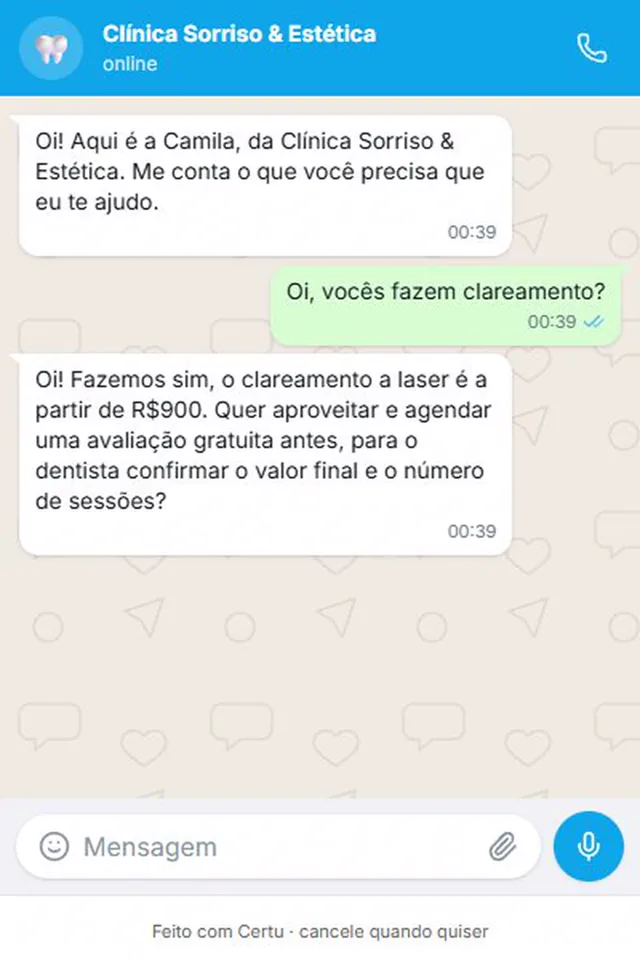
CertuAI demo with a fictional clinic. At 12:39 am, with the clinic closed, the question got an answer. The away message would only say there is nobody there.
Three rules for a good away message
What separates a useful notice from one that irritates.
Say when you are back
With day and time. "Soon" doesn't help anyone decide whether to wait or look elsewhere.
Ask for one thing to speed things up
The name and what the person needs. When you are back, the conversation already starts halfway.
Turn it off when you are back
An away notice while you are replying right there confuses the customer.
See how it looks in your industry
Each industry gets different questions on WhatsApp. Pick yours to see how CertuAI's AI serves that kind of customer.
How to turn on the away message in WhatsApp Business
The steps and button names are those of the WhatsApp Help Center for Android and iPhone, read on October 11, 2026. They apply to the WhatsApp Business app. On iPhone, a button name or two changes.
Open the Tools tab
In the WhatsApp Business app, tap Tools and then Away message.
Turn on sending
Turn on the Send away message option.
Write the text
Tap the message to edit it, paste one of the texts on this page, replace what is in brackets and confirm.
Choose the schedule
Tap Schedule and choose Always send, Custom schedule or Outside of business hours. The last one only appears if your business hours are already set in the business profile.
Choose who receives it
Tap Recipients and choose between Everyone, Everyone except my contacts, Everyone except... and Only send to...
Save
Tap Save. To turn it off later, go back to Tools, Away message, and turn off Send away message.
Away message, greeting and hours notice: which is which
The away message and the greeting message are the two notices WhatsApp Business sends on its own. The greeting goes out on the customer's first contact and again after 14 days with no conversation, according to the WhatsApp Help Center. The away message goes out when you say you're not there: always, in a set period or outside business hours.
This page covers the feature and the short everyday texts. For holidays, vacation, time off and the unexpected, the templates are in the notice that there will be no service. The templates for every night and for the weekend are in the outside-hours block of the automatic messages for customers, along with those for the other moments. A clinic with a professional who didn't show up has its own page: professional absence message and rescheduling.
Who receives the away message
Under Recipients, the app gives four options. The names are those of the WhatsApp Help Center.
- Everyone: everyone who writes while the feature is on.
- Everyone except my contacts: only people who are not saved in your contacts.
- Everyone except...: everyone, except the people you choose.
- Only send to...: only the contacts you choose.
Why the away message is not being sent
Four things to check.
- The phone has no internet: according to the WhatsApp Help Center, the device must be connected to the internet to send the away message.
- The Outside of business hours option doesn't appear: it only becomes available after you set your business hours in the business profile.
- The recipients leave the person out: with Everyone except my contacts, people saved in your contacts don't receive it. With Only send to..., only the people you chose receive it.
- Meta's AI is on in the app: the WhatsApp Help Center warns that greeting and away messages can be affected when the Meta Business Agent is turned on, and that deleting the agent restores access to those features. The steps are in how to turn off the AI in WhatsApp Business.
When not to use the away message
Five cases where the notice gets in the way more than it helps.
- You are replying: with Always send on, the customer gets "we're not here" and, right after, your reply. Turn it off when you return.
- To answer a question: the text is the same for everyone. It doesn't give the price, check the schedule or take the order.
- Without saying when you are back: a notice with no day and time leaves the customer not knowing whether to wait or look elsewhere.
- A real emergency: in health, safety and emergency repair, the notice needs to say where the person goes right now.
- A promise you don't keep: don't write "we reply in ten minutes" in a notice that goes out at 2 am.
How many messages arrive while the business is closed: CertuAI's data
The away message exists because customers write on their own time. The CertuAI team measured the hour customer messages arrive at 67 businesses that answer with CertuAI's AI: 32.5% arrived outside Monday to Friday, 8 am to 6 pm, and 34.6% of the conversations started in that period.
The number is the arrival time of the messages. How many of them received an away notice was not measured.
| What was measured | Result |
|---|---|
| Customer messages that arrived outside Monday to Friday, 8 a.m. to 6 p.m. | 32,5% |
| Conversations whose first message arrived outside Monday to Friday, 8 a.m. to 6 p.m. | 34,6% |
| Messages that arrived at night on a weekday, 6pm to midnight | 12,7% |
| Messages that arrived overnight on a weekday, from midnight to 8 a.m. | 3,9% |
| Messages that arrived on Saturday or Sunday | 15,8% |
Swipe the table sideways to see all the columns.
Source: CertuAI WhatsApp Customer Service Index, Q3 2026. CertuAI customer service data: 67 businesses of various kinds, 122,720 customer messages, from Jul 30 to Sep 30, 2026, measured on Oct 9, 2026. Business hours are Monday to Friday, 8 a.m. to 6 p.m., in each account's time zone. Test accounts, test contacts and imported history are left out. Redone every quarter.
Frequently asked questions
What is an away message on WhatsApp?
It is an automatic reply from WhatsApp Business. While it is on, anyone who writes to the business gets a text, which you write yourself, saying you are not available.
How do you set up an away message on WhatsApp Business?
In the Tools tab, tap Away message, turn on Send away message, write the text, choose the Schedule and the Recipients and tap Save.
How do you turn off the WhatsApp away message?
Open the Tools tab, tap Away message and turn off the Send away message option.
What is the difference between an away message and a greeting message?
The greeting welcomes the customer on first contact and after 14 days with no conversation. The away message says you are not available, at the schedule you choose.
What should you write in the away message?
Three things: that the message arrived, when you are back, with day and time, and what the person can already leave in writing to speed things up.
Does the away message answer the customer's questions?
No. It sends the same text to everyone. To answer price, hours or an order, you need a person or an AI agent connected to the number.
Where to go next?
The away message notifies. CertuAI's AI answers
On CertuAI, the AI answers right away anyone who writes when the business is closed: it gives the price, the hours and how to book, using what you taught the Brain, and leaves each conversation noted in the customer dashboard. When the subject needs a person, it alerts you.
From US$ 75 per month.
Create my agentOlá! Aqui é da [Empresa]. No momento não conseguimos responder, mas a sua mensagem ficou guardada. Voltamos a falar com você até [dia e hora].now ✓✓
This is the first message on this page, sent by the AI in your tone, with nobody at the counter.
In short
What is a WhatsApp away message and how do you set it up? The away message is an automatic reply from WhatsApp Business that tells the customer you are not available. To turn it on, open the Tools tab, tap Away message, turn on Send away message, write the text, choose the schedule and the recipients and tap Save. The phone needs an internet connection.
About CertuAI: CertuAI is the AI that answers a small business's WhatsApp, Instagram and Messenger 24/7, with a built-in CRM, and is a Tech Provider on Meta's WhatsApp Business Platform. Paid plans start at US$ 75 a month, with no lock-in. Create my agent